🔍 𝐈𝐬𝐬𝐮𝐞:
In Kubernetes, managing secure and controlled access to resources within your cluster is critical. Using default ServiceAccounts may expose your applications to unnecessary risks, leading to potential security vulnerabilities and uncontrolled access to cluster resources.
💡𝐅𝐢𝐱:
ServiceAccounts in Kubernetes offer a secure way to control how your applications interact with the Kubernetes API. Here's how to effectively create and manage ServiceAccounts, associate them with deployments or pods, and ensure they have the necessary permissions through Roles and RoleBindings.
📋 𝐄𝐱𝐚𝐦𝐩𝐥𝐞:
1. Creating a ServiceAccount
$ kubectl create serviceaccount my-service-account
2. Generating a Token for the ServiceAccount
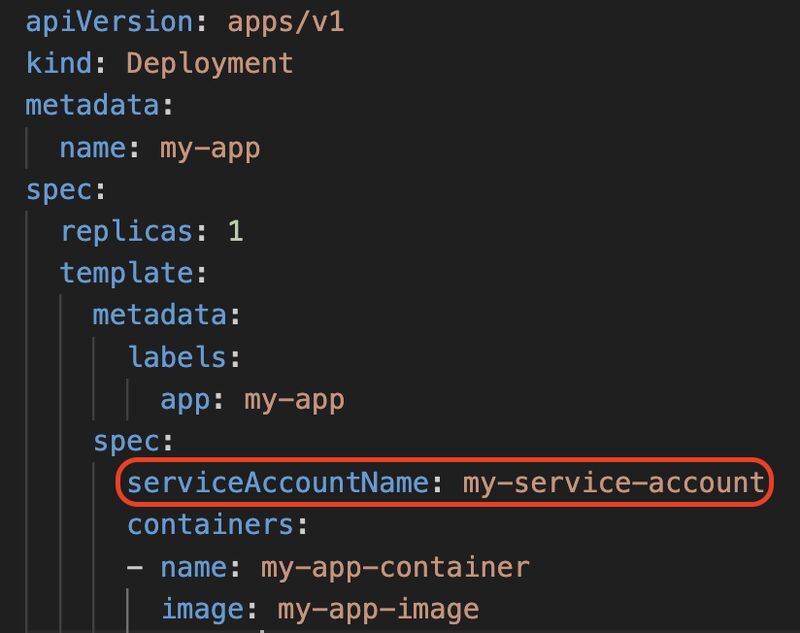
$ kubectl create token my-service-account3. Using the ServiceAccount in a Deployment --> as shown in code snippet.4. Accessing the Token in the Pod: After the ServiceAccount is specified in your deployment, the token is available within the pod at the path /var/run/secrets/https://lnkd.in/d4P6SBCM. You can verify this by describing the pod5. Assigning Necessary Permissions: Ensure that the ServiceAccount has the required permissions by creating Roles and RoleBindings🎓 𝐋𝐞𝐚𝐫𝐧𝐢𝐧𝐠s:
1. 𝐒𝐞𝐜𝐮𝐫𝐞 𝐀𝐏𝐈 𝐀𝐜𝐜𝐞𝐬𝐬: ServiceAccounts control API access for your applications, ensuring minimal privilege and heightened security.
2. 𝐓𝐨𝐤𝐞𝐧 𝐌𝐚𝐧𝐚𝐠𝐞𝐦𝐞𝐧𝐭: ServiceAccount tokens are automatically mounted in your pods, providing seamless access while maintaining security.