
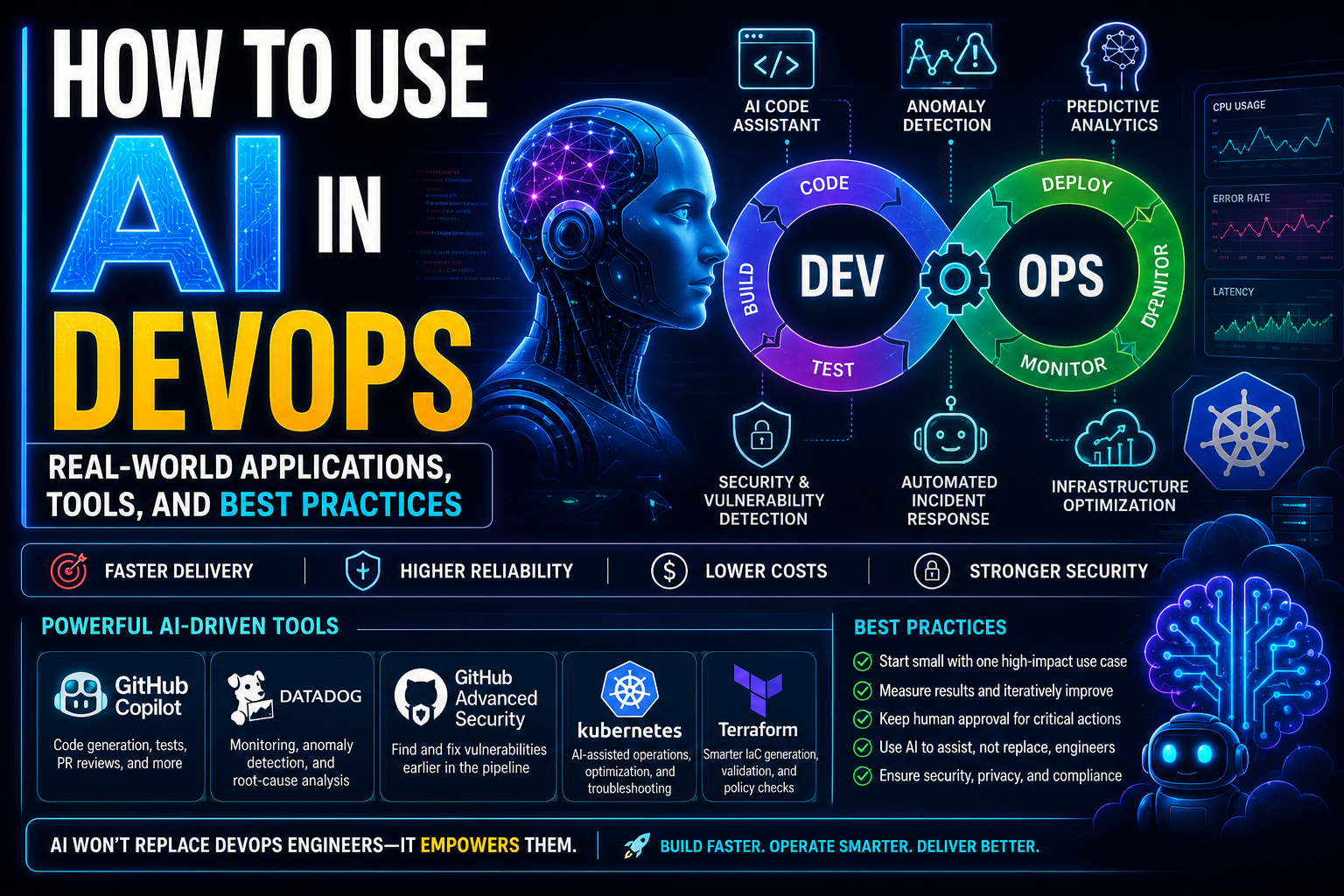
Artificial intelligence is no longer a side topic in DevOps. It is now being applied to code generation, pull request review, anomaly detection, incident investigation, and infrastructure optimization across modern delivery pipelines .
For teams running cloud-native platforms, the most useful question is not whether AI matters, but where it creates measurable value without adding unnecessary complexity. In practice, the strongest use cases appear in developer productivity, observability, security, and predictive operations .
What AI in DevOps actually means
AI in DevOps refers to applying machine learning and generative AI to software delivery and operations tasks such as writing code, reviewing changes, identifying anomalies, correlating alerts, forecasting failures, and recommending fixes . Instead of replacing engineers, these systems reduce repetitive work and help teams move faster with better context .
This matters because DevOps teams deal with large volumes of logs, metrics, traces, configuration files, and pipeline events that are hard to analyze manually at scale . AI becomes valuable when it shortens the time between detection, diagnosis, and action .
Real-world applications of AI in DevOps
1. Smarter CI/CD pipelines
AI is increasingly used to improve CI/CD pipelines by identifying bottlenecks, generating tests, suggesting workflow logic, and reviewing pull requests before merge . This helps teams reduce repetitive scripting work and improve delivery consistency.
A practical example is GitHub Copilot. GitHub describes Copilot as capable of multi-file code generation, intelligent refactoring, automated test creation, and AI-powered code review for pull requests . For DevOps engineers, that translates into faster creation of GitHub Actions workflows, shell scripts, Terraform snippets, and Kubernetes manifests .
2. Monitoring, alerting, and root-cause analysis
One of the clearest operational uses of AI is anomaly detection in observability platforms. Datadog states that its AIOps capabilities correlate telemetry and surface outliers, anomalies, and likely root causes across the stack, which helps teams investigate incidents faster .
Datadog’s Watchdog and anomaly detection features are designed to detect abnormal behavior in logs and metrics automatically instead of relying only on fixed thresholds . In real production environments, this is useful for catching rising latency, unusual error rates, noisy hosts, or abnormal database behavior before a customer-facing outage grows worse .
3. Incident response and predictive operations
AI also improves incident response by reducing alert fatigue and narrowing the search space during outages. Rather than forcing engineers to inspect dashboards one by one, AIOps systems can highlight correlated symptoms and likely causes from multiple signals .
This leads into predictive DevOps, where historical patterns are used to forecast likely failures or performance regressions before users are affected . The goal is not perfect prediction; it is earlier warning, better prioritization, and more proactive maintenance .
4. Security and vulnerability management
AI is also shaping DevSecOps workflows. Research and vendor material point to AI being used for vulnerability detection, misconfiguration analysis, dependency review, and policy enforcement in development pipelines .
For example, GitHub’s AI-assisted review capabilities can support earlier checks in the pull request stage, while security-focused tools can flag risky dependencies or suspicious patterns before deployment . This is especially useful in fast-moving environments where manual review alone often misses issues hidden inside large change sets .
5. Infrastructure efficiency and Kubernetes operations
Cloud and platform teams are also applying AI to right-size infrastructure, forecast demand, and improve autoscaling decisions . This is highly relevant in Kubernetes environments, where noisy workloads, fluctuating traffic, and overprovisioned resources can drive unnecessary spend.
In day-to-day work, AI-assisted tooling can help generate Kubernetes YAML, troubleshoot deployment issues, and identify unusual resource patterns across clusters . Used carefully, that can reduce manual toil for SRE and platform engineering teams while improving deployment reliability .
Key AI-powered tools to know
How AI changes team performance
The main productivity gain comes from shifting engineers away from low-value repetition and toward architecture, debugging, reliability work, and process improvement . Engineers still make the decisions, but AI can compress the time spent on drafting code, reviewing changes, and investigating incidents .
That said, performance improves only when teams use AI selectively. If every alert, recommendation, or code suggestion is accepted without review, the system can create new risk instead of removing it .
Limitations and cautions
AI in DevOps is useful, but it is not self-operating reliability. Generative tools can produce incorrect scripts or insecure configurations, and anomaly detection systems can still create false positives or miss context that an experienced engineer would catch .
Teams should also think carefully about data privacy, compliance, approval workflows, and accountability before pushing AI deeper into production processes . A strong operating model keeps humans responsible for validation, security review, and change approval.
Best practices for adopting AI in DevOps
- Start with one narrow use case such as PR review, anomaly detection, or pipeline test generation.
- Measure outcomes such as deployment frequency, mean time to resolution, alert noise, or engineering time saved.
- Keep human approval for production-impacting changes.
- Use AI to assist investigation and authoring first, then expand into prediction and automation.
- Document where AI is allowed, what data it can access, and how outputs must be reviewed.
Final take
AI works best in DevOps when it supports real engineering problems: reducing repetitive work, accelerating investigations, improving code review, and surfacing patterns that are hard to catch manually . The winning approach is practical rather than hype-driven: start with clear operational pain points, validate the benefit, and keep human judgment in the loop .