
Introduction
You are an administrator of a large Kubernetes cluster shared by many teams. You want to grant each team access only to the resources they are permitted to use.
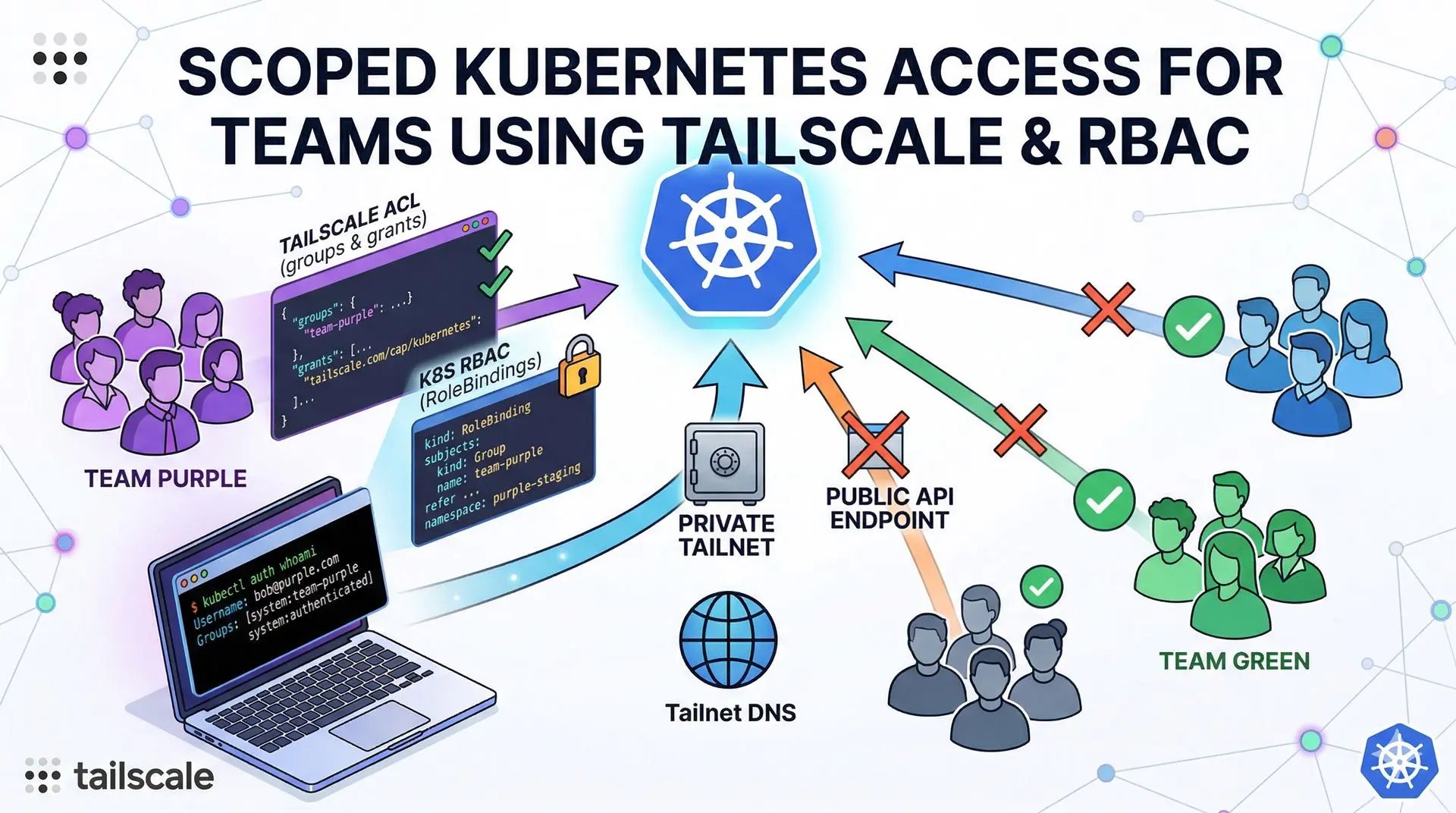
In this guide, I’ll show you how to configure permissions with Tailscale and secure your Kubernetes API so you can provide access without exposing your Kubernetes API endpoint publicly.
This approach combines Tailscale identity-based access controls with Kubernetes RBAC, giving you:
- secure, scoped access per team,
- private access to the Kubernetes API,
- simpler access management by tying permissions to Tailscale groups.
Prerequisites
Before you begin, make sure you have:
- A Tailscale account.
- A Kubernetes cluster.
- Tailscale Kubernetes Operator installed with
apiServerProxyConfig.modeenabled.
Step 1: Create a Tailscale group for your team
Create a Tailscale group for your team and assign its members to it.
For example, to create a team-purple group:
json"groups": {
  "group:team-purple": ["bob@purple.com", "alex@purple.com"]
}
You can add more users as needed.
Step 2: Grant your group access to Kubernetes
Next, grant your Tailscale group access to Kubernetes.
In your Tailscale ACLs, define a grant that allows the team-purple group to access the Kubernetes Operator:
json"grants": [
  {
    "src": ["group:team-purple"],
    "dst": ["tag:k8s-operator"],
    "ip":  ["*"],
    "app": {
      "tailscale.com/cap/kubernetes": [
        {
          "impersonate": {
            "groups": ["team-purple"]
          }
        }
      ]
    }
  }
]
This configuration:
- allows members of
group:team-purpleto connect to the Kubernetes Operator, - impersonates them in Kubernetes as the
team-purplegroup.
Step 3: Create RoleBindings in Kubernetes
Create RoleBinding resources in the namespaces your team should have access to.
For example, give team-purple admin access in the purple-staging and purple-prod namespaces:
---
apiVersion: rbac.authorization.k8s.io/v1
kind: RoleBinding
metadata:
  name: team-purple-admin
  namespace: purple-staging
subjects:
  - kind: Group
    apiGroup: rbac.authorization.k8s.io
    name: team-purple
roleRef:
  apiGroup: rbac.authorization.k8s.io
  kind: ClusterRole
  name: admin
---
apiVersion: rbac.authorization.k8s.io/v1
kind: RoleBinding
metadata:
  name: team-purple-admin
  namespace: purple-prod
subjects:
  - kind: Group
    apiGroup: rbac.authorization.k8s.io
  name: team-purple
roleRef:
  apiGroup: rbac.authorization.k8s.io
  kind: ClusterRole
  name: admin
You can repeat this pattern for other teams and namespaces, adjusting the name, namespace, and roleRef as needed.
Step 4: Provide the kubeconfig file to your team
Share a kubeconfig file with your team that uses the Tailscale endpoint.
Example:
apiVersion: v1
clusters:
  - cluster:
      server: https://k8s-tailscale-operator.YOUR_TAILNET_DNS.ts.net
    name: team-purple
contexts:
  - context:
      cluster: team-purple
      user: tailscale-auth
    name: team-purple
current-context: team-purple
kind: Config
users:
  - name: tailscale-auth
    user:
      token: unused
Replace YOUR_TAILNET_DNS with your actual Tailscale DNS domain.
Step 5: Connect and verify access
On each client machine:
- Start Tailscale and connect to your tailnet.
- Use the provided
kubeconfigto access the cluster. - Run the auth command to verify access:
kubectl auth whoamiExpected output:
ATTRIBUTE   VALUE
Username    bob@purple.com
Groups      system:team-purple system:authenticated
Your team should now have access only to the resources they are allowed to use.
Conclusion
By combining Tailscale identity-based access controls with Kubernetes RBAC, you can:
- give each team secure, scoped access to only the namespaces and resources they are allowed to use,
- keep your Kubernetes API private,
- avoid exposing it publicly,
- simplify access management by tying permissions to your Tailscale groups.
This is a clean, modern way to manage multi-team access to Kubernetes without adding complex network layers or public endpoints.