
Introduction
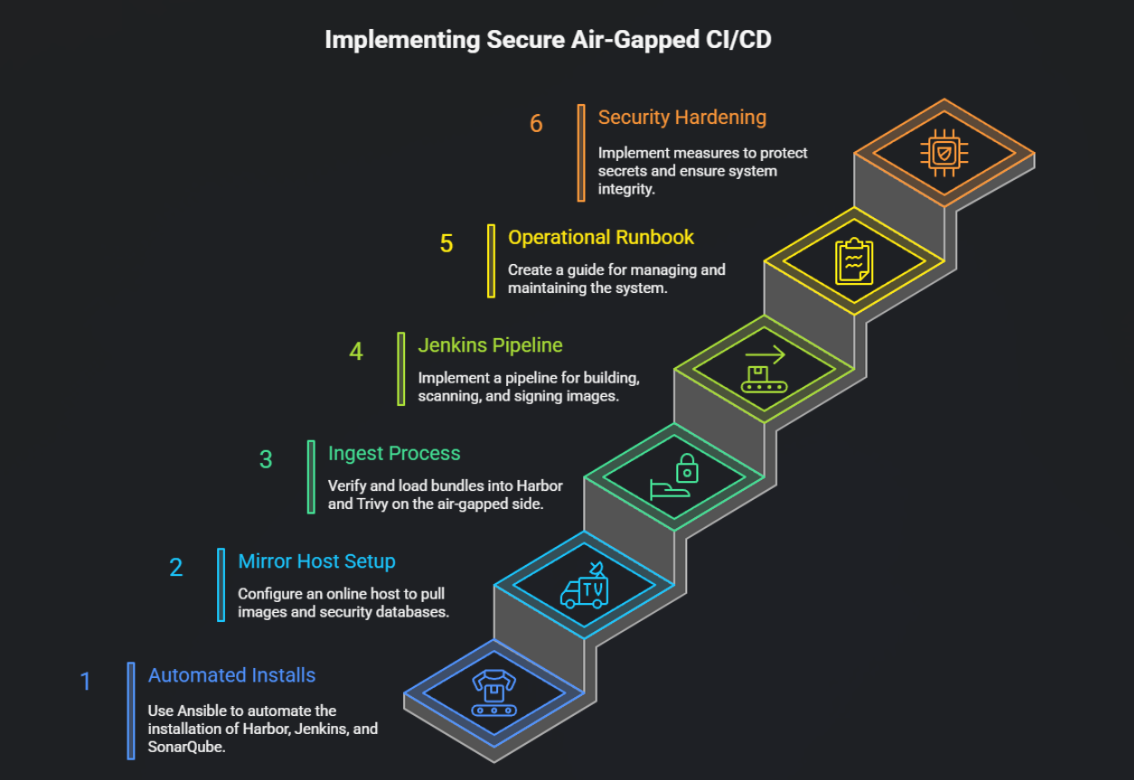
Air-gapped environments are common in regulated industries (defense, banking, pharma) where clusters and CI/CD systems cannot talk directly to the public internet. The challenge is to keep development velocity without sacrificing security: builds must run, images must be scanned and signed, and artifacts must be available inside the offline environment — all while keeping a controlled, auditable update path.
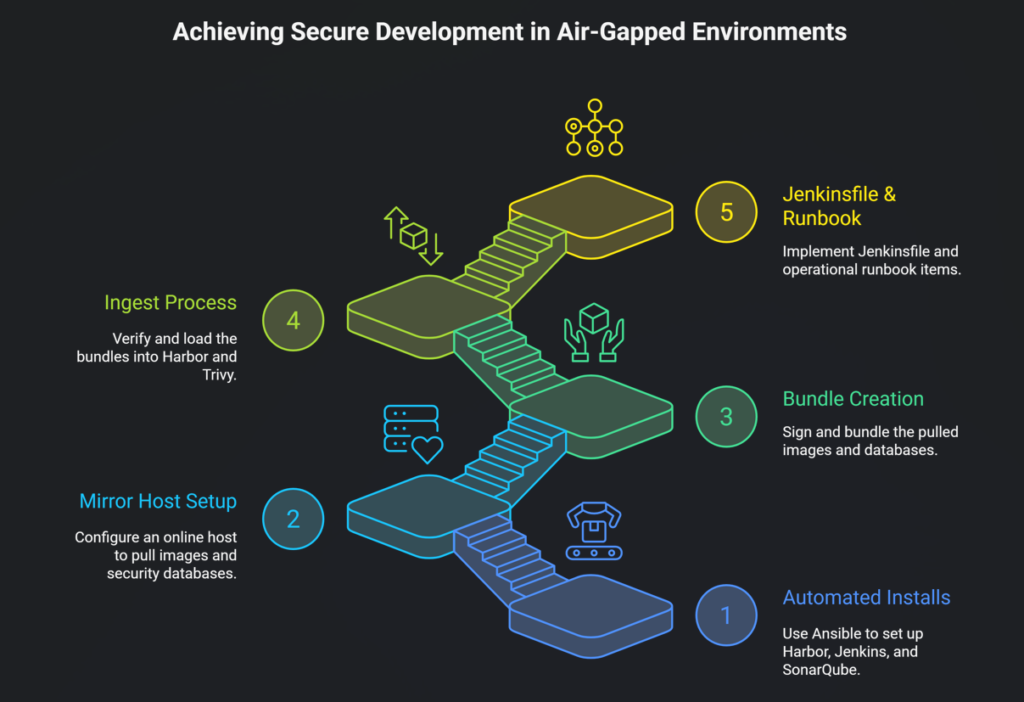
This guide delivers a complete, reproducible solution:
- Automated installs for Harbor (image registry), Jenkins (CI), and SonarQube (code analysis) using Ansible.
- A mirror host (online/Bastion) that pulls images and security DBs and produces signed bundles.
- An ingest process (air-gapped side) that verifies and loads bundles into Harbor and Trivy.
- Example Jenkinsfile (Kaniko) and operational runbook items.
Everything below is copy-paste ready — adapt variables, enable Ansible Vault for secrets, and follow your compliance SOP for media transfers.
Architecture (high level)
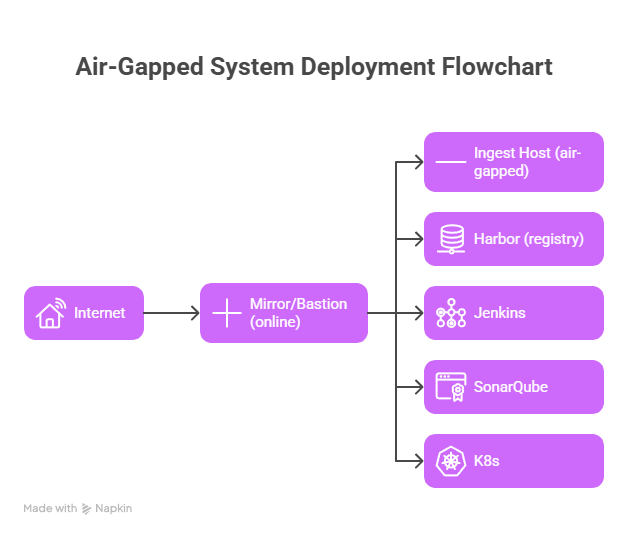
Key goals:
- Offline build and deploy workflows.
- Offline vulnerability DB updates (Trivy).
- Signed images (cosign) and verification.
- Auditable transfer of signed bundles.
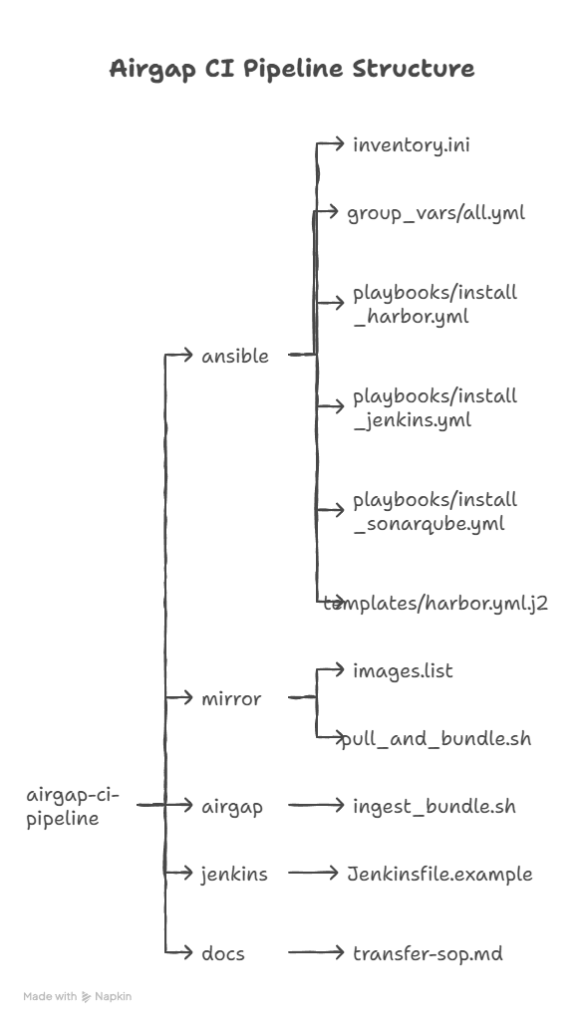
Repo layout (recommended)
Prerequisites & security notes
- Mirror host (online): controlled machine with restricted access to perform downloads and produce signed bundles. Tools:
skopeo,trivy,gpg,tar. - Ingest host (air-gapped): host inside offline network used to ingest signed bundles and push to Harbor.
- Ansible control host: machine where you run the Ansible playbooks that can SSH to target servers in the air-gapped network.
- Secrets: use Ansible Vault or HashiCorp Vault — do not store plaintext passwords.
- Signing keys: store
cosign/GPG private keys securely; ideally in HSM or guarded offline keystore.
Ansible: inventory & common vars
ansible/inventory.ini
[harbor]
harbor.internal.local ansible_user=ubuntu

[jenkins]
jenkins.internal.local ansible_user=ubuntu

[sonarqube]
sonar.internal.local ansible_user=ubuntu

[all:vars]ansible_python_interpreter=/usr/bin/python3
ansible/group_vars/all.yml
harbor_version: "v2.7.3"harbor_install_dir: "/opt/harbor"harbor_hostname: "harbor.internal.local"harbor_admin_password: "{{ vault_harbor_admin_password }}"

jenkins_home: "/var/lib/jenkins"jenkins_admin_user: "admin"jenkins_admin_password: "{{ vault_jenkins_admin_password }}"

sonarqube_version: "9.11.1"sonarqube_install_dir: "/opt/sonarqube"
Important: Replace
{{ vault_* }}with values stored in Ansible Vault or inject via extra-vars. Never commit secrets.
Ansible playbook: install_harbor.yml
This playbook installs Harbor using a pre-downloaded offline installer tarball. It assumes the installer tar has been uploaded to the target host (or provided via Ansible copy).
ansible/playbooks/install_harbor.yml
---- name: Install Harbor (air-gapped)hosts: harborbecome: yesvars_files:
    - ../group_vars/all.ymltasks:
    - name: Ensure apt cache updated
      apt:
        update_cache: yes
      when: ansible_os_family == "Debian"

    - name: Install required packages (docker, unzip, wget)
      apt:
        name:
          - docker.io
          - docker-compose
          - unzip
          - wget
        state: present
        update_cache: yes

    - name: Ensure docker service is running
      service:
        name: docker
        state: started
        enabled: yes

    - name: Create install dir
      file:
        path: "{{ harbor_install_dir }}"
        state: directory
        owner: root
        group: root
        mode: "0755"

    - name: Copy offline Harbor installer archive (pre-uploaded locally)
      copy:
        src: "{{ harbor_offline_installer }}"
        dest: "{{ harbor_install_dir }}/harbor-offline.tgz"
        mode: "0644"

    - name: Extract Harbor installer
      unarchive:
        src: "{{ harbor_install_dir }}/harbor-offline.tgz"
        dest: "{{ harbor_install_dir }}"
        remote_src: yes

    - name: Template harbor.yml
      template:
        src: ../templates/harbor.yml.j2
        dest: "{{ harbor_install_dir }}/harbor.yml"
      vars:
        hostname: "{{ harbor_hostname }}"
        harbor_admin_password: "{{ harbor_admin_password }}"

    - name: Run Harbor install script
      shell: |
        set -e
        cd {{ harbor_install_dir }}
        ./install.sh --with-clair --with-chartmuseum
      args:
        chdir: "{{ harbor_install_dir }}"

    - name: Wait for Harbor to respond on port 443
      wait_for:
        host: "{{ harbor_hostname }}"
        port: 443
        timeout: 180
ansible/templates/harbor.yml.j2 (minimal)
hostname: {{ hostname }}
http:port: 443harbor_admin_password: {{ harbor_admin_password }}
# For air-gapped, configure external database or bundled DB; add TLS cert paths if needed.
Ansible playbook: install_jenkins.yml
Installs a simple systemd service running Jenkins WAR. For production prefer containerized Jenkins with PVCs and backups.
ansible/playbooks/install_jenkins.yml
---- name: Install Jenkins (air-gapped)hosts: jenkinsbecome: yesvars_files:
    - ../group_vars/all.ymltasks:
    - name: Install Java
      apt:
        name: openjdk-17-jdk
        state: present

    - name: Create jenkins user and home
      user:
        name: jenkins
        home: "{{ jenkins_home }}"
        system: yes
        create_home: yes

    - name: Ensure required packages
      apt:
        name:
          - docker.io
          - git
        state: present

    - name: Copy Jenkins WAR (assumes uploaded under ansible/files)
      copy:
        src: files/jenkins.war
        dest: /opt/jenkins.war
        mode: "0644"

    - name: Create systemd unit for Jenkins
      copy:
        dest: /etc/systemd/system/jenkins.service
        content: |
          [Unit]
          Description=Jenkins (Standalone WAR)
          After=network.target

          [Service]
          Type=simple
          Restart=always
          User=jenkins
          ExecStart=/usr/bin/java -jar /opt/jenkins.war --httpPort=8080
          Environment=JENKINS_HOME={{ jenkins_home }}

          [Install]
          WantedBy=multi-user.target
      notify:
        - daemon-reload
        - start-jenkins

  handlers:
    - name: daemon-reload
      systemd:
        daemon_reload: yes

    - name: start-jenkins
      systemd:
        name: jenkins
        state: started
        enabled: yes
Tip: Replace the standalone WAR approach with a containerized Jenkins + PVCs for robustness, using Helm to deploy inside Kubernetes if you have a cluster in the air-gapped environment.
Ansible playbook: install_sonarqube.yml
Installs SonarQube offline. Uses pre-uploaded zip bundle.
ansible/playbooks/install_sonarqube.yml
---- name: Install SonarQube (air-gapped)hosts: sonarqubebecome: yesvars_files:
    - ../group_vars/all.ymltasks:
    - name: Install Java
      apt:
        name: openjdk-11-jdk
        state: present

    - name: Create sonarqube user
      user:
        name: sonarqube
        system: yes
        create_home: yes
        home: "{{ sonarqube_install_dir }}"

    - name: Copy SonarQube bundle (pre-uploaded)
      copy:
        src: files/sonarqube-{{ sonarqube_version }}.zip
        dest: /tmp/sonarqube.zip
        mode: "0644"

    - name: Extract SonarQube
      unarchive:
        src: /tmp/sonarqube.zip
        dest: /opt
        remote_src: yes

    - name: Symlink versioned dir
      file:
        src: "/opt/sonarqube-{{ sonarqube_version }}"
        dest: "{{ sonarqube_install_dir }}"
        state: link

    - name: Create systemd service for SonarQube
      copy:
        dest: /etc/systemd/system/sonarqube.service
        content: |
          [Unit]
          Description=SonarQube
          After=syslog.target network.target

          [Service]
          Type=forking
          ExecStart={{ sonarqube_install_dir }}/bin/linux-x86-64/sonar.sh start
          ExecStop={{ sonarqube_install_dir }}/bin/linux-x86-64/sonar.sh stop
          User=sonarqube
          Group=sonarqube
          Restart=always

          [Install]
          WantedBy=multi-user.target
      notify:
        - daemon-reload
        - start-sonarqube

  handlers:
    - name: daemon-reload
      systemd:
        daemon_reload: yes

    - name: start-sonarqube
      systemd:
        name: sonarqube
        state: started
        enabled: yes
Mirror (online) script — pull_and_bundle.sh
Run on the mirror/bastion (online). It pulls container images to OCI layout, downloads the Trivy DB, bundles them, and signs the bundle.
mirror/pull_and_bundle.sh
#!/usr/bin/env bashset -euo pipefail
IMAGES_FILE="${1:-./images.list}"
OUT_DIR="${2:-./bundle_output}"
TRIVY_CACHE="${OUT_DIR}/trivydb"
OCI_LAYOUT_DIR="${OUT_DIR}/oci_images"
BUNDLE_NAME="airgap-bundle-$(date +%F-%H%M).tar.gz"

mkdir -p "${OUT_DIR}" "${TRIVY_CACHE}" "${OCI_LAYOUT_DIR}"

log() { echo "[$(date --iso-8601=seconds)] $*"; }

if [ ! -f "${IMAGES_FILE}" ]; thenlog "ERROR: images list not found: ${IMAGES_FILE}"
  exit 2
fi

log "Start image copy to OCI layout..."while IFS= read -r image || [ -n "$image" ]; do
  image="${image%%#*}" # strip comments
  image="${image## }"
  [ -z "$image" ] && continue
  repo_safe=$(echo "$image" | sed 's/[^a-zA-Z0-9._-]/_/g')
  dest="${OCI_LAYOUT_DIR}/${repo_safe}"
  log "Copying ${image} -> ${dest}"
  skopeo copy --all "docker://${image}" "oci:${dest}:latest" || { log "Failed to copy ${image}"; exit 3; }
done < "${IMAGES_FILE}"

log "Download Trivy DB..."
trivy db --download-db-only --cache-dir "${TRIVY_CACHE}"

log "Create archive bundle: ${BUNDLE_NAME}"
tar -C "${OUT_DIR}" -czf "${OUT_DIR}/${BUNDLE_NAME}" oci_images trivydb || { log "tar failed"; exit 4; }

log "Generate SHA256 and GPG sign"sha256sum "${OUT_DIR}/${BUNDLE_NAME}" > "${OUT_DIR}/${BUNDLE_NAME}.sha256"
gpg --detach-sign --armor --output "${OUT_DIR}/${BUNDLE_NAME}.asc" "${OUT_DIR}/${BUNDLE_NAME}"

log "Bundle created: ${OUT_DIR}/${BUNDLE_NAME}"
log "Files: ${OUT_DIR}/${BUNDLE_NAME} ${OUT_DIR}/${BUNDLE_NAME}.sha256 ${OUT_DIR}/${BUNDLE_NAME}.asc"
log "End."
mirror/images.list example
docker.io/library/nginx:1.25
docker.io/library/node:18
docker.io/library/alpine:3.18
gcr.io/distroless/java:17
# comments allowed
Ingest (air-gapped) script — ingest_bundle.sh
Run on the air-gapped ingest host. It verifies the checksum and signature, loads OCI images to Harbor using skopeo, and places Trivy DB into the local path used by Trivy on build agents.
airgap/ingest_bundle.sh
#!/usr/bin/env bashset -euo pipefail
BUNDLE_TAR="${1:?bundle tar required}"
HARBOR_URL="${2:?harbor url required}"
HARBOR_PROJECT="${3:-library}"
HARBOR_USER="${4:?user}"
HARBOR_PASS="${5:?pass}"
TMPDIR="$(mktemp -d /tmp/airgap_ingest.XXXX)"
TRIVY_DB_DIR="/var/lib/trivy/db"log() { echo "[$(date --iso-8601=seconds)] $*"; }

if [ ! -f "${BUNDLE_TAR}" ]; thenlog "ERROR: bundle not found: ${BUNDLE_TAR}"
  exit 2
fi

log "Verifying SHA256..."if [ -f "${BUNDLE_TAR}.sha256" ]; thensha256sum -c "${BUNDLE_TAR}.sha256" || { log "Checksum verification failed"; exit 3; }
elselog "WARNING: checksum file not found: ${BUNDLE_TAR}.sha256"
fi

log "Verifying GPG signature..."if [ -f "${BUNDLE_TAR}.asc" ]; then
  gpg --verify "${BUNDLE_TAR}.asc" "${BUNDLE_TAR}" || { log "GPG verification failed"; exit 4; }
elselog "WARNING: signature file not found: ${BUNDLE_TAR}.asc"
fi

log "Extracting bundle to ${TMPDIR}"
tar -xzf "${BUNDLE_TAR}" -C "${TMPDIR}"

log "Loading OCI images..."if [ -d "${TMPDIR}/oci_images" ]; thenfor oci_dir in "${TMPDIR}/oci_images"/* ; do
    [ -d "$oci_dir" ] || continue
    base=$(basename "$oci_dir")
    target="docker://${HARBOR_URL}/${HARBOR_PROJECT}/${base}:latest"
    log "Pushing oci:${oci_dir}:latest -> ${target}"
    skopeo copy --all "oci:${oci_dir}:latest" "${target}" --dest-creds "${HARBOR_USER}:${HARBOR_PASS}" || { log "skopeo push failed for ${base}"; exit 5; }
  doneelselog "No OCI images found in bundle"fi

log "Importing Trivy DB..."if [ -d "${TMPDIR}/trivydb" ]; then
  sudo rm -rf "${TRIVY_DB_DIR}" || true
  sudo mkdir -p "${TRIVY_DB_DIR}"
  sudo cp -r "${TMPDIR}/trivydb"/* "${TRIVY_DB_DIR}/"
  log "Trivy DB installed to ${TRIVY_DB_DIR}"
elselog "No Trivy DB in bundle"fi

log "Cleanup tmp"rm -rf "${TMPDIR}"
log "Ingest complete"
Example Jenkinsfile (Kaniko) — Jenkinsfile.example
This is one example pipeline (run on a Kubernetes agent or node with Kaniko binary). It builds, scans (Trivy), signs (cosign), and pushes to Harbor.
jenkins/Jenkinsfile.example
pipeline {
  agent any
  environment {
    HARBOR = "harbor.internal.local"
    PROJECT = "library"
    IMAGE = "${HARBOR}/${PROJECT}/${env.JOB_NAME}:${env.BUILD_NUMBER}"
    TRIVY_CACHE_DIR = "/tmp/trivy-db"
  }
  stages {
    stage('Checkout') {
      steps { checkout scm }
    }
    stage('Unit Tests') {
      steps { sh 'npm ci && npm test' }
    }
    stage('Build Image (Kaniko)') {
      steps {
        sh """
          /kaniko/executor --context . --dockerfile Dockerfile \
            --destination ${IMAGE} --cache=true
        """
      }
    }
    stage('Trivy Scan') {
      steps {
        sh """
          trivy image --cache-dir ${TRIVY_CACHE_DIR} --severity HIGH,CRITICAL --exit-code 1 ${IMAGE} || true
        """
      }
    }
    stage('Sign Image') {
      steps {
        withCredentials([file(credentialsId: 'COSIGN_KEY', variable: 'COSIGN_KEY_FILE')]) {
          sh """
            export COSIGN_PASSWORD=$(cat /run/secrets/cosign_pass)
            cosign sign --key ${COSIGN_KEY_FILE} ${IMAGE}
          """
        }
      }
    }
    stage('Deploy (dev)') {
      steps {
        sh "kubectl -n dev set image deployment/myapp myapp=${IMAGE}"
      }
    }
  }
  post {
    always {
      archiveArtifacts artifacts: 'reports/**', allowEmptyArchive: true
    }
  }
}
Use Kaniko or Buildah for daemonless builds. Ensure
TRIVY_CACHE_DIRpoints to the local Trivy DB ingested from the bundle.
Transfer SOP (summary) — docs/transfer-sop.md
Minimal chain-of-custody steps (expand to meet your compliance requirements):
- Mirror admin prepares bundle and generates
bundle.tar.gz,bundle.tar.gz.sha256, andbundle.tar.gz.asc. - Security reviewer verifies checksums and signature on the mirror host, signs off.
- Approved, encrypted removable media (USB) is used to copy the bundle. A transfer record (operator name, time, asset ID) is created.
- At ingress to the air-gapped facility, the operator signs and logs entry. The Security officer verifies signatures again.
- On ingest host, verify checksum and GPG signature. Only then proceed to load images and DB.
- After successful ingest, the media is wiped (or returned according to SOP). Keep audit logs and snapshot of Harbor records.
Testing & Validation Checklist
- Mirror script completes and bundle created with
.sha256and.asc. - GPG & checksum verification succeed on ingest host.
skopeopushes to Harbor succeed; images are visible in Harbor UI.- Trivy DB is installed in
/var/lib/trivy/dband scans work offline on Jenkins agents. - Jenkins pipeline builds using Harbor base images without internet.
- Image signing via
cosignis present and can be verified. - Kubernetes nodes can pull images from Harbor using configured pull secrets.
- DR test: remove an image from Harbor and reingest bundle to restore it.
- Retention & cleanup policies applied in Harbor (prune old images).
Operational & Security Hardening Recommendations
- Secrets & Credentials: Use Ansible Vault or Vault. No plaintext secrets in repo.
- Key protection: Store signing keys in HSM or at minimum in a secured vault; tightly control access.
- Robot accounts: Use Harbor robot accounts for CI push operations; rotate tokens regularly.
- Least privilege: Jenkins agents and ingest processes should run with minimum rights.
- Network segmentation: Isolate CI systems from production network if required; limit egress.
- Audit logging: Centralize logs (offline ELK or another log store). Log every transfer and ingestion event.
- Monitoring: Export Harbor/Jenkins metrics to Prometheus (internal) and create alerts for failed ingest or scan anomalies.
- Bundle size optimization: Mirror only required base images and runtime images. Use small base images and minimize layers.
Common pitfalls & how to avoid them
- Stale vulnerability DBs — define an update cadence (daily/weekly) and automation for verification.
- Huge bundle sizes — avoid mirroring unnecessary images; use layer reuse and smaller base images.
- Key compromise — store keys securely and rotate periodically; use HSM if possible.
- Transfer failures — always validate checksums/signatures before ingestion. Have retry & partial-update procedures.
- Secrets leakage — never hardcode credentials; integrate Vault.
How to run the Ansible playbooks (example)
- Place offline installers and artifact files under
ansible/files/(e.g., Harbor offline installer, Jenkins WAR, SonarQube zip). - Ensure
ansible/inventory.inipoints to your target hosts and that the control host can SSH. - Use Ansible Vault for sensitive variables:
ansible-vault encrypt_string 'SuperSecretHarborPass' --name 'vault_harbor_admin_password' >> ansible/group_vars/all.yml - Run the Harbor playbook:
cd ansible/playbooks ansible-playbook -i ../inventory.ini install_harbor.yml --ask-vault-pass - Repeat for Jenkins and SonarQube.
Conclusion
This guide delivers a full, practical implementation for a secure air-gapped CI/CD pipeline: automated installs via Ansible, repeatable mirror/ingest scripts, example Jenkins pipeline, and operational runbooks. The core patterns — mirrored artifacts, signed bundles, offline DB ingestion, and CI pipelines using internal registries — give you a secure, auditable workflow that preserves development velocity inside air-gapped constraints.