
If you’ve worked with Kubernetes long enough, you already know this truth:
Most Kubernetes issues don’t start in the cluster. They start in YAML.
A missing resource limit.
A privileged container left unnoticed.
No readiness probe, no liveness probe.
Everything looks fine… until it isn’t.
That’s exactly the problem K8sGuardian Engine is built to solve.
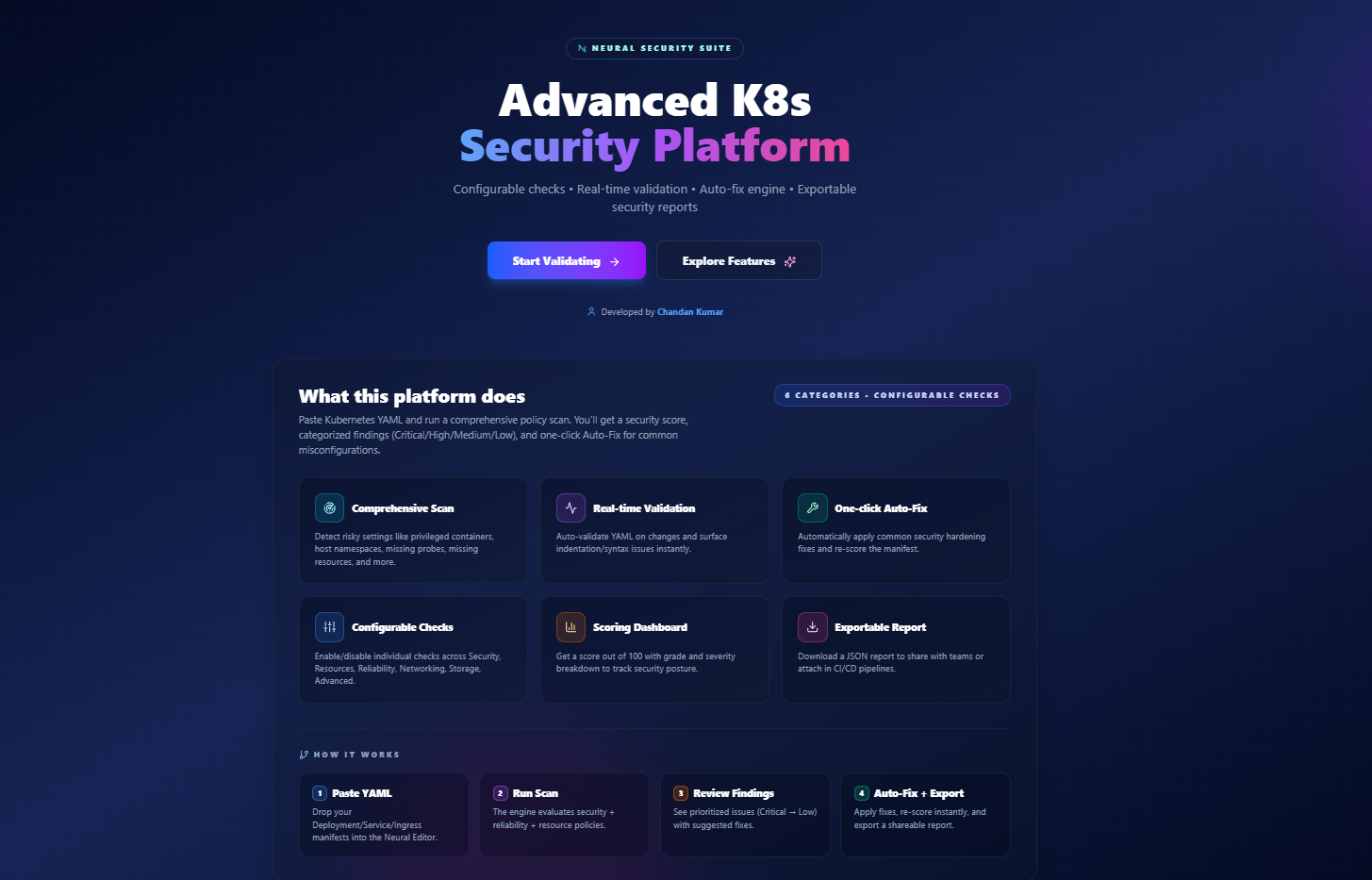
K8sGuardian Engine is a simple, browser-based Kubernetes YAML security and quality checker. You paste your manifest, run a scan, and instantly see what’s risky, what’s missing, and what should be fixed — before the YAML ever touches a cluster.
This platform is built and maintained by Chandan Kumar, based on real production issues faced by DevOps and Kubernetes teams.

Why K8sGuardian Engine Exists
In most teams today, Kubernetes YAML reviews look like this:
- YAML is copied into a pull request
- Review depends on one or two senior engineers
- Security issues are caught late (or not at all)
- Developers don’t always understand why something is wrong
Over time, this leads to:
- Inconsistent standards
- Fragile workloads
- Avoidable outages
- Security risks slipping into production
K8sGuardian Engine exists to catch these problems early — at the YAML level.
No cluster access. No kubeconfig. No agents.
Just better YAML.

What K8sGuardian Engine Does
At its core, K8sGuardian Engine performs a deep policy scan on Kubernetes manifests.
You can paste:
- Deployments
- Services
- Ingress resources
- Other common Kubernetes workloads
And the engine will:
- Analyze security, reliability, and resource usage
- Assign a security score out of 100
- Categorize findings as Critical, High, Medium, or Low
- Suggest clear, actionable fixes
- Auto-fix common and safe misconfigurations
All of this happens directly in the browser.
Six Core Scan Categories
K8sGuardian Engine checks Kubernetes YAML across six practical categories that matter in real environments.
1. Security
- Privileged containers
- Containers running as root
- AllowPrivilegeEscalation enabled
- Use of hostNetwork, hostPID, or hostIPC
2. Resources
- Missing CPU requests and limits
- Missing memory requests and limits
- Risk of noisy-neighbor problems
3. Reliability
- Missing liveness probes
- Missing readiness probes
- Basic crash-loop risk patterns
4. Networking
- Risky service exposure patterns
- Common ingress misconfigurations
5. Storage
- Unsafe volume configurations
- hostPath usage warnings
6. Advanced Checks
- Kubernetes anti-patterns
- Gaps in production hardening
Each check can be enabled or disabled, so teams can align scans with their own standards.

Real-time YAML Validation
Before you even run a scan, the Guardian Editor validates YAML in real time.
This helps catch:
- Indentation mistakes
- Syntax errors
- Structural YAML issues
It sounds simple, but it saves a surprising amount of time during daily work.
One-click Auto-Fix (Where It Makes Sense)
Some Kubernetes issues are obvious and safe to fix automatically.
For these cases, K8sGuardian Engine provides one-click Auto-Fix, such as:
- Adding missing resource requests and limits
- Inserting basic liveness and readiness probes
- Applying common security hardening defaults
After applying fixes, the YAML is re-scored immediately, so you can clearly see the improvement.
The goal is not to hide problems — but to make best practices easy to apply.

Security Scoring That Actually Helps
Every scan produces a clear dashboard:
- Overall score (0–100)
- A simple grade (A, B, or C)
- Breakdown by severity
- Critical
- High
- Medium
- Low
This makes it easy to:
- Compare manifests
- Track improvement after fixes
- Set internal quality baselines
Exportable Reports for Teams and CI/CD
Once a scan is complete, you can export the results as a JSON report.
This is useful for:
- Sharing findings with teammates
- Attaching reports to pull requests
- Using results in CI/CD pipelines
- Supporting security and compliance reviews
K8sGuardian Engine fits naturally into shift-left DevSecOps workflows.

How K8sGuardian Engine Works
Step 1: Paste YAML
Paste your Kubernetes manifest into the Guardian Editor.
Step 2: Run Scan
The engine evaluates security, reliability, and resource policies.
Step 3: Review Findings
Issues are prioritized from Critical to Low, with clear explanations.
Step 4: Auto-Fix and Export
Apply fixes, re-score instantly, and export a shareable report.
Who This Tool Is For
K8sGuardian Engine is designed for people who work with Kubernetes every day:
- Developers writing application manifests
- DevOps and SRE engineers maintaining clusters
- DevSecOps teams shifting security left
- Anyone learning Kubernetes best practices
It’s especially useful when you want fast feedback without spinning up tools or accessing clusters.
Final Thoughts
Kubernetes security doesn’t always require complex tools or deep cluster integrations.
Sometimes, the biggest improvements come from better YAML, reviewed earlier.
K8sGuardian Engine focuses on exactly that — helping teams write safer, more reliable Kubernetes manifests with confidence.
👉 Try it now at k8sguardian.online
Built with care by Chandan Kumar, based on real Kubernetes production experience.
You’ve made some really good points there. I checked on the web to learn more about the issue and found most people will go along with your views on this website.