
Table of Contents
- What is Kubernetes & Why AWS EKS?
- Architecture Overview
- Prerequisites Checklist
- AWS IAM Setup
- Install CLI Tools
- VPC & Networking Setup
- Create the EKS Cluster
- Configure Node Groups
- Connect kubectl to Cluster
- Deploy Your First App
- Expose via Load Balancer
- Auto Scaling Setup
- Monitoring & Logging
- Cleanup & Cost Control
01 — What is Kubernetes & Why AWS EKS?
Kubernetes (K8s) is an open-source container orchestration platform that automates deployment, scaling, and management of containerized applications. Originally built by Google in 2014, it is now used by almost every major tech company in production environments.
Amazon EKS (Elastic Kubernetes Service) is AWS’s fully managed Kubernetes service. This means you do not need to manage the Control Plane yourself — AWS handles it for you. You simply focus on your worker nodes and applications.
Why Choose EKS?
| Feature | Benefit |
|---|---|
| 🔧 Managed Control Plane | AWS handles API server, etcd, scheduler — 99.95% SLA guarantee |
| ⚡ AWS Native Integration | IAM, VPC, ALB, CloudWatch, ECR — all seamlessly integrated |
| 📈 Auto Scaling | Cluster Autoscaler + Karpenter — nodes scale automatically with demand |
| 🔒 Enterprise Security | RBAC, IRSA, Secrets Manager — production-grade security built-in |
EKS vs Self-Managed Kubernetes: With self-managed Kubernetes, you must set up the Control Plane yourself, manage etcd, and handle upgrades manually. EKS delegates all of this to AWS. For production workloads, EKS is always the better choice.
EKS Pricing Breakdown
- Cluster (Control Plane): $0.10/hour per cluster (~$73/month)
- Worker Nodes: EC2 instance pricing (e.g. t3.medium ≈ $0.0416/hour)
- Fargate (serverless nodes): Pay-per-use based on vCPU and memory
- Data Transfer: Intra-AZ is free; cross-AZ costs $0.01/GB
02 — Architecture Overview
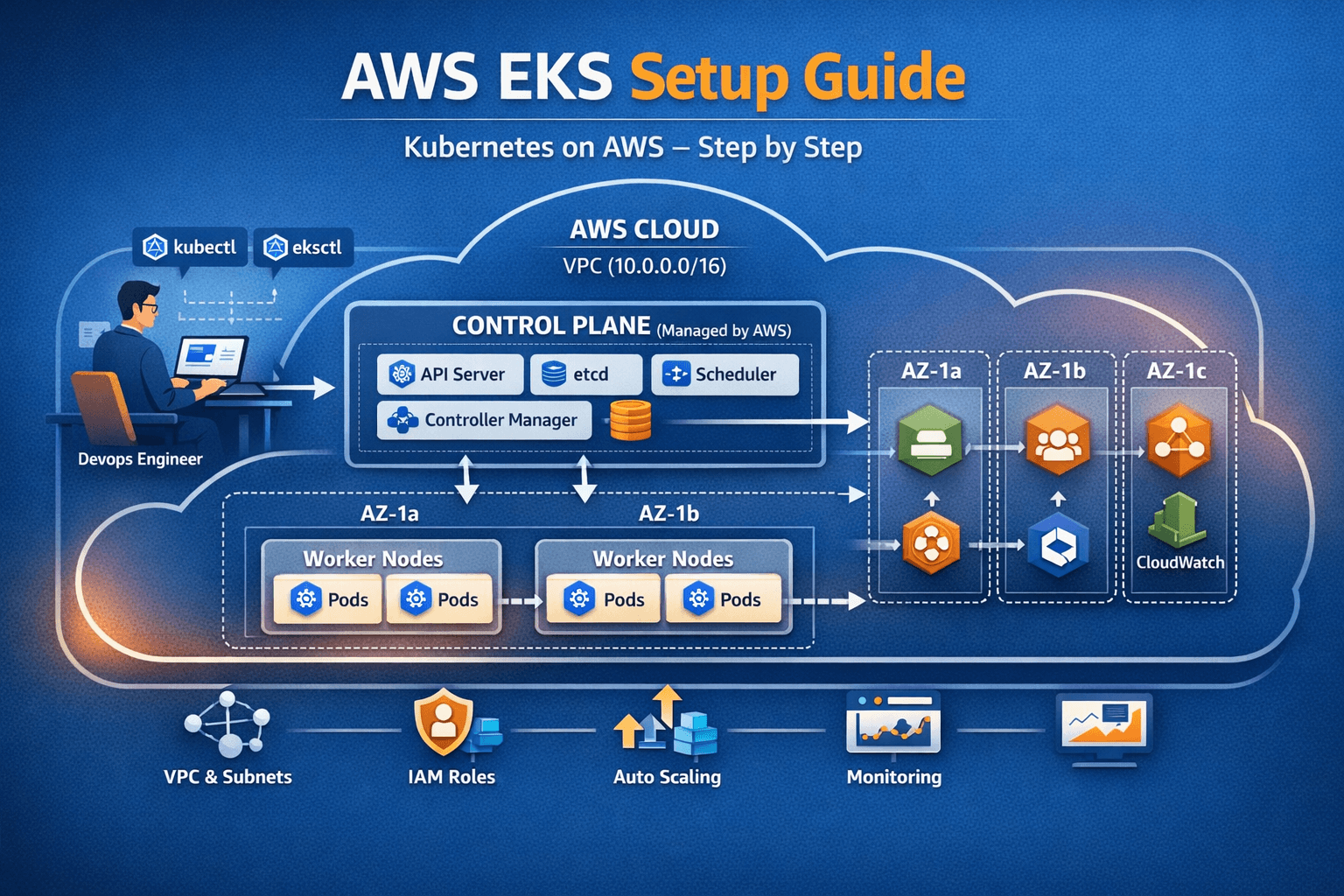
Before diving into commands, understand the complete picture — then we will go deeper into each component.
text┌─────────────────────────── AWS CLOUD ───────────────────────────────┐
│  ┌────────────────────── VPC (10.0.0.0/16) ──────────────────────┐  │
│  │                                                                 │  │
│  │  [kubectl / eksctl] ───►   CONTROL PLANE  (Managed by AWS)     │  │
│  │   DevOps Engineer          kube-apiserver | etcd               │  │
│  │                            scheduler | controller-manager      │  │
│  │                                    │                           │  │
│  │       ┌────────────────────────────┼────────────────┐          │  │
│  │       ▼                            ▼                ▼          │  │
│  │  ┌── AZ-1a ──┐             ┌── AZ-1b ──┐    ┌── AZ-1c ──┐    │  │
│  │  │ Worker 1  │             │ Worker 3  │    │    ALB    │    │  │
│  │  │ Pod A | B │             │ Pod E | F │    │    ECR    │    │  │
│  │  │ Worker 2  │             │           │    │CloudWatch │    │  │
│  │  │ Pod C | D │             │           │    │           │    │  │
│  │  └───────────┘             └───────────┘    └───────────┘    │  │
│  └─────────────────────────────────────────────────────────────┘  │
└─────────────────────────────────────────────────────────────────────┘
Control Plane Components
kube-apiserver— REST API gateway; every kubectl command goes through hereetcd— distributed key-value store; the brain and memory of the clusterkube-scheduler— decides which node a pod should run onkube-controller-manager— runs reconciliation loops (desired vs actual state)cloud-controller-manager— handles AWS-specific integrations (ELB, EBS, etc.)
Worker Node Components
kubelet— node agent that communicates with the control planekube-proxy— manages network rules (iptables/IPVS) on each nodecontainerd— container runtime responsible for pulling/running imagesVPC CNI— AWS-native pod networking pluginCoreDNS— handles all DNS resolution within the cluster
03 — Prerequisites Checklist
Make sure everything below is ready before you start. Skipping any item leads to issues later.
| Requirement | Version | Check Command |
|---|---|---|
| AWS Account | Active, billing enabled | aws sts get-caller-identity |
| AWS CLI | v2.x (latest) | aws --version |
| eksctl | v0.180.0+ | eksctl version |
| kubectl | v1.28+ (match cluster version) | kubectl version --client |
| Docker | v24+ (for building images) | docker --version |
| Helm | v3.x (for package management) | helm version |
| IAM Permissions | Admin or EKS-specific policies | AWS Console |
| Region Decision | e.g. us-east-1, ap-south-1 | aws configure get region |
⚠️ Match your kubectl version! The kubectl version must be within ±1 minor version of your cluster’s Kubernetes version. If your cluster runs 1.28 but kubectl is 1.25 — commands will fail. Always match them.
04 — AWS IAM Setup — Correct Permissions
IAM is a straightforward step, but it causes the most mistakes. Both approaches are covered below — quick (admin) and production-ready (least privilege).
Option A: Quick Dev Setup (Admin User)
aws iam create-group --group-name EKS-Admins

aws iam attach-group-policy \
  --group-name EKS-Admins \
  --policy-arn arn:aws:iam::aws:policy/AdministratorAccess

aws iam add-user-to-group \
  --user-name your-username \
  --group-name EKS-Admins
Option B: Production (Least Privilege Policy)
Save the following as eks-admin-policy.json:
json{
  "Version": "2012-10-17",
  "Statement": [{
    "Sid": "EKSClusterManagement",
    "Effect": "Allow",
    "Action": [
      "eks:*",
      "ec2:*",
      "iam:CreateRole",
      "iam:AttachRolePolicy",
      "iam:DetachRolePolicy",
      "iam:CreateInstanceProfile",
      "iam:AddRoleToInstanceProfile",
      "iam:PassRole",
      "iam:GetRole",
      "iam:CreateOpenIDConnectProvider",
      "iam:TagOpenIDConnectProvider",
      "cloudformation:*",
      "autoscaling:*",
      "elasticloadbalancing:*",
      "ssm:GetParameter"
    ],
    "Resource": "*"
  }]
}
aws iam create-policy \
  --policy-name EKSAdminPolicy \
  --policy-document file://eks-admin-policy.json

# Save the policy ARN from the output
# "Arn": "arn:aws:iam::123456789012:policy/EKSAdminPolicy"
Configure AWS CLI
$ aws configure
AWS Access Key ID [None]: AKIAIOSFODNN7EXAMPLE
AWS Secret Access Key [None]: wJalrXUtnFEMI/K7MDENG...
Default region name [None]: ap-south-1
Default output format [None]: json

# Verify the configuration
$ aws sts get-caller-identity
{
  "UserId": "AIDAIOSFODNN7EXAMPLE",
  "Account": "123456789012",
  "Arn": "arn:aws:iam::123456789012:user/eks-admin"
}
💡 Pro Tip: Instead of long-term access keys, use AWS IAM Identity Center (SSO). Run
aws sso login --profile eks-profileto receive temporary credentials — far more secure for team environments.
05 — Install All CLI Tools
1. AWS CLI v2
Linux / Ubuntu:
curl "https://awscli.amazonaws.com/awscli-exe-linux-x86_64.zip" -o "awscliv2.zip"
unzip awscliv2.zip
sudo ./aws/install
aws --version
# aws-cli/2.17.0 Python/3.11.6 Linux/5.15.0
macOS:
brew install awscliWindows (PowerShell):
msiexec.exe /i https://awscli.amazonaws.com/AWSCLIV2.msi2. eksctl
eksctl is the official CLI tool by Weaveworks for creating and managing EKS clusters. It sets up a complete cluster with a single command.
Linux:
ARCH=amd64
PLATFORM=$(uname -s)_$ARCH
curl -sLO "https://github.com/eksctl-io/eksctl/releases/latest/download/eksctl_${PLATFORM}.tar.gz"
tar -xzf eksctl_${PLATFORM}.tar.gz -C /tmp
sudo mv /tmp/eksctl /usr/local/bin
eksctl version
# 0.186.0
macOS:
brew tap weaveworks/tap
brew install weaveworks/tap/eksctl
3. kubectl
kubectl is the command-line tool to communicate with your cluster — deploy pods, view services, and fetch logs.
Linux:
curl -LO "https://dl.k8s.io/release/$(curl -L -s https://dl.k8s.io/release/stable.txt)/bin/linux/amd64/kubectl"
sudo install -o root -g root -m 0755 kubectl /usr/local/bin/kubectl
kubectl version --client --output=yaml
# gitVersion: v1.29.3
macOS:
brew install kubectl4. Helm
curl https://raw.githubusercontent.com/helm/helm/main/scripts/get-helm-3 | bash
helm version
# version.BuildInfo{Version:"v3.14.0"}
06 — VPC & Networking Setup
Proper VPC configuration is critical for EKS. Worker nodes should be in private subnets. Load balancers and NAT Gateways live in public subnets.
VPC CloudFormation Template
Save as eks-vpc.yaml — this creates 6 subnets across 3 Availability Zones:
AWSTemplateFormatVersion: '2010-09-09'
Description: 'EKS Production VPC — 3 AZ, Public + Private Subnets'

Parameters:
  ClusterName:
    Type: String
    Default: my-eks-cluster

Resources:
  VPC:
    Type: AWS::EC2::VPC
    Properties:
      CidrBlock: 10.0.0.0/16
      EnableDnsHostnames: true
      EnableDnsSupport: true
      Tags:
        - Key: Name
          Value: !Sub '${ClusterName}-vpc'
        - Key: !Sub 'kubernetes.io/cluster/${ClusterName}'
          Value: shared

  PublicSubnet1:
    Type: AWS::EC2::Subnet
    Properties:
      VpcId: !Ref VPC
      CidrBlock: 10.0.1.0/24
      AvailabilityZone: !Select [0, !GetAZs '']
      MapPublicIpOnLaunch: true
      Tags:
        - Key: kubernetes.io/role/elb
          Value: '1'

  PrivateSubnet1:
    Type: AWS::EC2::Subnet
    Properties:
      VpcId: !Ref VPC
      CidrBlock: 10.0.10.0/24
      AvailabilityZone: !Select [0, !GetAZs '']
      Tags:
        - Key: kubernetes.io/role/internal-elb
          Value: '1'

  InternetGateway:
    Type: AWS::EC2::InternetGateway

  NATGateway1:
    Type: AWS::EC2::NatGateway
    Properties:
      AllocationId: !GetAtt EIP1.AllocationId
      SubnetId: !Ref PublicSubnet1
aws cloudformation create-stack \
--stack-name eks-vpc \
--template-body file://eks-vpc.yaml \
--capabilities CAPABILITY_IAM
aws cloudformation wait stack-create-complete --stack-name eks-vpc
# ✓ Stack created successfullyRequired Subnet Tags
| Tag Key | Tag Value | Subnet Type | Purpose |
|---|---|---|---|
kubernetes.io/role/elb | 1 | Public | Internet-facing ALB/NLB |
kubernetes.io/role/internal-elb | 1 | Private | Internal load balancers |
kubernetes.io/cluster/CLUSTER_NAME | shared or owned | Both | EKS cluster identification |
⚠️ These tags are mandatory. Without them, the AWS Load Balancer Controller will not be able to discover your subnets and create load balancers automatically.
07 — Create the EKS Cluster
Now the real work begins. We will use the eksctl config file approach for full control and repeatability.
Complete cluster-config.yaml
apiVersion: eksctl.io/v1alpha5
kind: ClusterConfig

metadata:
  name: my-production-cluster
  region: ap-south-1             # Mumbai region
  version: "1.29"                # Kubernetes version
  tags:
    Environment: production
    Team: platform-engineering
    CostCenter: k8s-infra

vpc:
  id: "vpc-0a1b2c3d4e5f67890"    # Your VPC ID from Step 6
  subnets:
    private:
      ap-south-1a:
        id: "subnet-0private1"
      ap-south-1b:
        id: "subnet-0private2"
      ap-south-1c:
        id: "subnet-0private3"
    public:
      ap-south-1a:
        id: "subnet-0public1"
      ap-south-1b:
        id: "subnet-0public2"

iam:
  withOIDC: true                  # Required for IRSA
  serviceAccounts:
  - metadata:
      name: aws-load-balancer-controller
      namespace: kube-system
    wellKnownPolicies:
      awsLoadBalancerController: true

addons:
- name: vpc-cni
  version: latest
  attachPolicyARNs:
    - arn:aws:iam::aws:policy/AmazonEKS_CNI_Policy
- name: coredns
  version: latest
- name: kube-proxy
  version: latest
- name: aws-ebs-csi-driver
  version: latest
  wellKnownPolicies:
    ebsCSIController: true

managedNodeGroups:
- name: general-purpose
  instanceType: t3.medium
  minSize: 2
  maxSize: 6
  desiredCapacity: 3
  privateNetworking: true
  subnets:
    - ap-south-1a
    - ap-south-1b
    - ap-south-1c
  labels:
    role: general
    lifecycle: on-demand
  tags:
    k8s.io/cluster-autoscaler/enabled: "true"
    k8s.io/cluster-autoscaler/my-production-cluster: "owned"
  iam:
    attachPolicyARNs:
      - arn:aws:iam::aws:policy/AmazonEKSWorkerNodePolicy
      - arn:aws:iam::aws:policy/AmazonEC2ContainerRegistryReadOnly
      - arn:aws:iam::aws:policy/AmazonEKS_CNI_Policy
      - arn:aws:iam::aws:policy/CloudWatchAgentServerPolicy

cloudWatch:
  clusterLogging:
    enableTypes:
      - api
      - audit
      - authenticator
      - controllerManager
      - scheduler
Run the Cluster Creation Command
eksctl create cluster -f cluster-config.yaml

# Expected output:
# [ℹ] eksctl version 0.186.0
# [ℹ] using region ap-south-1
# [ℹ] creating EKS cluster "my-production-cluster"
# [✔] EKS cluster "my-production-cluster" in "ap-south-1" region is ready
⚠️ This takes time! Cluster creation typically takes 15–20 minutes. Do not close your terminal.
08 — Node Groups Deep Dive
Use multiple node groups for different workload types to optimize both cost and reliability.
| Node Group Type | Use Case | Cost | Interruption Risk |
|---|---|---|---|
| On-Demand | Critical workloads, databases | High | None |
| Spot Instances | Batch jobs, stateless apps | 60–90% cheaper | Medium (2-min warning) |
| Fargate Profile | Serverless pods, isolated workloads | Per-use | None |
Add a Spot Node Group
Save as spot-nodegroup.yaml:
apiVersion: eksctl.io/v1alpha5
kind: ClusterConfig

metadata:
  name: my-production-cluster
  region: ap-south-1

managedNodeGroups:
- name: spot-workers
  instanceTypes:              # Multiple types improve availability
    - m5.large
    - m5a.large
    - m4.large
    - t3.large
  spot: true
  minSize: 0
  maxSize: 20
  desiredCapacity: 3
  privateNetworking: true
  labels:
    role: spot-worker
    lifecycle: spot
  taints:
    - key: spot
      value: "true"
      effect: NoSchedule
eksctl create nodegroup -f spot-nodegroup.yaml
kubectl get nodes --show-labels
# NAME STATUS ROLES AGE VERSION
# ip-10-0-10-45.ap-south-1... Ready <none> 12m v1.29.3-eks-adc7111
# ip-10-0-11-23.ap-south-1... Ready <none> 11m v1.29.3-eks-adc711109 — Connect kubectl to the Cluster
aws eks update-kubeconfig \
  --region ap-south-1 \
  --name my-production-cluster

# Output:
# Added new context arn:aws:eks:ap-south-1:123456789012:cluster/my-production-cluster

# Verify the connection
kubectl cluster-info
# Kubernetes control plane is running at https://ABC123.gr7.ap-south-1.eks.amazonaws.com

kubectl get nodes
# NAME                          STATUS   ROLES    AGE   VERSION
# ip-10-0-10-45.compute...      Ready    <none>   18m   v1.29.3-eks-adc7111
Managing Multiple Cluster Contexts
# List all contexts
kubectl config get-contexts

# Switch context
kubectl config use-context arn:aws:eks:ap-south-1:123456789:cluster/staging

# Using kubectx (recommended tool)
brew install kubectx
kubectx prod       # Switch to production cluster
kubens production  # Switch namespace
Essential kubectl Commands
# ── CLUSTER INFO ──────────────────────────────
kubectl cluster-info
kubectl get nodes -o wide
kubectl get all --all-namespaces
kubectl top nodes
kubectl top pods -A

# ── PODS ──────────────────────────────────────
kubectl get pods -A
kubectl get pods -n kube-system
kubectl describe pod POD_NAME
kubectl logs POD_NAME -f              # Follow logs
kubectl logs POD_NAME -c CONTAINER    # Specific container
kubectl exec -it POD_NAME -- /bin/bash

# ── DEPLOYMENTS ───────────────────────────────
kubectl get deployments
kubectl rollout status deployment/NAME
kubectl rollout history deployment/NAME
kubectl rollout undo deployment/NAME  # Rollback to previous version
kubectl scale deployment/NAME --replicas=5

# ── DEBUGGING ─────────────────────────────────
kubectl get events --sort-by=.lastTimestamp
kubectl describe node NODE_NAME
kubectl get componentstatuses
10 — Deploy a Production Application
A complete example including Deployment, Service, ConfigMap, Secret, and HPA — everything you need for a real workload.
Step 1: Create a Namespace
kubectl create namespace production
kubectl label namespace production env=production
Step 2: Create Secrets
kubectl create secret generic db-credentials \
  --from-literal=DB_HOST=rds.ap-south-1.rds.amazonaws.com \
  --from-literal=DB_PASSWORD=supersecret \
  --namespace production
Step 3: Full Application Manifest
Save as app-deployment.yaml:
---
# ConfigMap
apiVersion: v1
kind: ConfigMap
metadata:
  name: app-config
  namespace: production
data:
  APP_ENV: production
  LOG_LEVEL: info
  MAX_CONNECTIONS: "100"
---
# Deployment
apiVersion: apps/v1
kind: Deployment
metadata:
  name: web-app
  namespace: production
  labels:
    app: web-app
    version: v1.0.0
spec:
  replicas: 3
  selector:
    matchLabels:
      app: web-app
  strategy:
    type: RollingUpdate
    rollingUpdate:
      maxSurge: 1
      maxUnavailable: 0        # Zero downtime deployments
  template:
    metadata:
      labels:
        app: web-app
    spec:
      containers:
      - name: web-app
        image: nginx:1.25-alpine
        ports:
        - containerPort: 80
        resources:
          requests:
            memory: "128Mi"
            cpu: "100m"
          limits:
            memory: "256Mi"
            cpu: "500m"
        envFrom:
        - configMapRef:
            name: app-config
        - secretRef:
            name: db-credentials
        readinessProbe:
          httpGet:
            path: /health
            port: 80
          initialDelaySeconds: 10
          periodSeconds: 5
        livenessProbe:
          httpGet:
            path: /health
            port: 80
          initialDelaySeconds: 15
          periodSeconds: 10
      affinity:
        podAntiAffinity:
          preferredDuringSchedulingIgnoredDuringExecution:
          - weight: 100
            podAffinityTerm:
              labelSelector:
                matchExpressions:
                - key: app
                  operator: In
                  values: [web-app]
              topologyKey: kubernetes.io/hostname  # Spread pods across nodes
kubectl apply -f app-deployment.yaml
kubectl get pods -n production
# NAME READY STATUS RESTARTS AGE
# web-app-6d8f9b7c8d-4xkp2 1/1 Running 0 2m
# web-app-6d8f9b7c8d-7mnq9 1/1 Running 0 2m
# web-app-6d8f9b7c8d-rv2x1 1/1 Running 0 2m11 — Expose via Load Balancer
# service.yaml
apiVersion: v1
kind: Service
metadata:
  name: web-app-service
  namespace: production
  annotations:
    service.beta.kubernetes.io/aws-load-balancer-type: "nlb"
    service.beta.kubernetes.io/aws-load-balancer-scheme: "internet-facing"
spec:
  type: LoadBalancer
  selector:
    app: web-app
  ports:
  - port: 80
    targetPort: 80
    protocol: TCP
kubectl apply -f service.yaml
kubectl get svc -n production
# NAME TYPE CLUSTER-IP EXTERNAL-IP
# web-app-service LoadBalancer 172.20.1.45 abc123.elb.amazonaws.com
# Test the endpoint
curl http://abc123.elb.amazonaws.comIngress with AWS Load Balancer Controller
apiVersion: networking.k8s.io/v1
kind: Ingress
metadata:
  name: web-app-ingress
  namespace: production
  annotations:
    kubernetes.io/ingress.class: alb
    alb.ingress.kubernetes.io/scheme: internet-facing
    alb.ingress.kubernetes.io/target-type: ip
    alb.ingress.kubernetes.io/certificate-arn: arn:aws:acm:ap-south-1:ACCOUNT:certificate/xxx
spec:
  rules:
  - host: myapp.example.com
    http:
      paths:
      - path: /
        pathType: Prefix
        backend:
          service:
            name: web-app-service
            port:
              number: 80
12 — Auto Scaling Setup
Horizontal Pod Autoscaler (HPA)
apiVersion: autoscaling/v2
kind: HorizontalPodAutoscaler
metadata:
  name: web-app-hpa
  namespace: production
spec:
  scaleTargetRef:
    apiVersion: apps/v1
    kind: Deployment
    name: web-app
  minReplicas: 3
  maxReplicas: 20
  metrics:
  - type: Resource
    resource:
      name: cpu
      target:
        type: Utilization
        averageUtilization: 70
  - type: Resource
    resource:
      name: memory
      target:
        type: Utilization
        averageUtilization: 80
  behavior:
    scaleUp:
      stabilizationWindowSeconds: 60
      policies:
      - type: Percent
        value: 100
        periodSeconds: 60
    scaleDown:
      stabilizationWindowSeconds: 300   # Wait 5 mins before scaling down
Cluster Autoscaler Install
helm repo add autoscaler https://kubernetes.github.io/autoscaler
helm install cluster-autoscaler autoscaler/cluster-autoscaler \
  --namespace kube-system \
  --set autoDiscovery.clusterName=my-production-cluster \
  --set awsRegion=ap-south-1 \
  --set rbac.serviceAccount.annotations."eks\.amazonaws\.com/role-arn"=arn:aws:iam::ACCOUNT_ID:role/cluster-autoscaler

# Verify
kubectl get pods -n kube-system | grep autoscaler
# cluster-autoscaler-xxx   1/1   Running   0   5m
How Scaling Works Together
High CPU detected
        │
        ▼
   HPA adds pods
        │
        ▼
No nodes available?
        │
        ▼
Cluster Autoscaler adds a new EC2 node
        │
        ▼
New pods scheduled on new node ✓
13 — Monitoring & Logging
Prometheus + Grafana via Helm
helm repo add prometheus-community https://prometheus-community.github.io/helm-charts
helm repo update

helm install kube-prometheus-stack \
  prometheus-community/kube-prometheus-stack \
  --namespace monitoring \
  --create-namespace \
  --set grafana.enabled=true \
  --set grafana.adminPassword=admin123 \
  --set alertmanager.enabled=true

# Access Grafana dashboard
kubectl port-forward -n monitoring svc/kube-prometheus-stack-grafana 3000:80
# Open: http://localhost:3000  (admin / admin123)
CloudWatch Container Insights
ClusterName=my-production-cluster
RegionName=ap-south-1

curl -s https://raw.githubusercontent.com/aws-samples/amazon-cloudwatch-container-insights/latest/k8s-deployment-manifest-templates/deployment-mode/daemonset/container-insights-monitoring/quickstart/cwagent-fluent-bit-quickstart.yaml | \
  sed -e "s/{{cluster_name}}/${ClusterName}/;s/{{region_name}}/${RegionName}/" | \
  kubectl apply -f -
Alertmanager — Slack/PagerDuty Alerts
apiVersion: monitoring.coreos.com/v1alpha1
kind: AlertmanagerConfig
metadata:
  name: slack-alerts
  namespace: monitoring
spec:
  route:
    groupBy: ['alertname', 'namespace']
    groupWait: 30s
    repeatInterval: 4h
    receiver: slack-notifications
  receivers:
  - name: slack-notifications
    slackConfigs:
    - apiURL:
        name: slack-webhook
        key: url
      channel: '#k8s-alerts'
      sendResolved: true
      title: '{{ .Status | toUpper }} — {{ .CommonLabels.alertname }}'
Must-Have Grafana Dashboards
- ✅ Node CPU, Memory, and Disk usage over time
- ✅ Pod restart count and OOMKilled events
- ✅ API server latency and request rate
- ✅ Deployment replica count vs desired
- ✅ Namespace-level resource quota usage
- ✅ HPA scaling events timeline
14 — Cleanup & Cost Control
⚠️ IMPORTANT: EKS resources cost money. If you built this for learning and are not actively using it, delete everything immediately. The control plane alone costs ~$73/month plus EC2 node charges.
Safe Cleanup Order
Step 1 — Delete applications and Ingress first (removes load balancers before VPC teardown, otherwise VPC gets stuck):
kubectl delete ingress --all --all-namespaces
kubectl delete svc --all -n production
Step 2 — Delete node groups:
eksctl delete nodegroup \
  --cluster my-production-cluster \
  --name general-purpose \
  --region ap-south-1
Step 3 — Delete the EKS cluster (10–15 minutes):
eksctl delete cluster \
  --name my-production-cluster \
  --region ap-south-1 \
  --wait
Step 4 — Clean up VPC and CloudFormation stacks:
aws cloudformation delete-stack --stack-name eks-vpcCost Optimization Best Practices
- ✅ Use Spot Instances for non-critical workloads — 60–90% cost savings
- ✅ Scale down dev clusters on nights and weekends using scheduled scaling
- ✅ Purchase AWS Savings Plans for committed, predictable workloads
- ✅ Regularly clean up unused namespaces, PVCs, and load balancers
- ✅ Set Resource Quotas on every namespace to prevent runaway costs
- ✅ Review costs weekly with AWS Cost Explorer and set billing alerts
Common Troubleshooting Issues
| Issue | Likely Cause | Fix |
|---|---|---|
Nodes stuck in NotReady | CNI plugin not installed | Check vpc-cni addon |
Pods in Pending | Insufficient node resources | Check kubectl describe pod events |
| OIDC error on IRSA | Provider not associated | Re-run eksctl utils associate-iam-oidc-provider |
| Load balancer not created | Missing subnet tags | Add kubernetes.io/role/elb: "1" tag |
| High unexpected costs | Unused load balancers | Delete unused services of type LoadBalancer |
| kubectl auth error | Expired credentials | Run aws eks update-kubeconfig again |
Here are all the reference links for your blog, organized by category:
📚 Official Reference Links
AWS & EKS — Official Docs
| # | Title | Link |
|---|---|---|
| 1 | Amazon EKS Official Documentation | https://docs.aws.amazon.com/eks/ |
| 2 | Create an EKS Cluster — AWS Docs | https://docs.aws.amazon.com/eks/latest/userguide/create-cluster.html |
| 3 | Getting Started with EKS (eksctl) | https://docs.aws.amazon.com/eks/latest/userguide/getting-started-eksctl.html |
| 4 | Create Amazon VPC for EKS | https://docs.aws.amazon.com/eks/latest/userguide/creating-a-vpc.html |
| 5 | Amazon EKS Best Practices Guide | https://docs.aws.amazon.com/eks/latest/best-practices/introduction.html |
| 6 | EKS Managed Node Groups | https://docs.aws.amazon.com/eks/latest/userguide/managed-node-groups.html |
| 7 | EKS Add-ons Documentation | https://docs.aws.amazon.com/eks/latest/userguide/eks-add-ons.html |
| 8 | Amazon EKS — AWS Product Page | https://aws.amazon.com/eks/ |
eksctl — Official Docs
| # | Title | Link |
|---|---|---|
| 9 | eksctl GitHub Repository | https://github.com/eksctl-io/eksctl |
| 10 | eksctl Official Documentation | https://eksctl.io/ |
| 11 | eksctl — Creating & Managing Clusters | https://eksctl.io/usage/creating-and-managing-clusters/ |
| 12 | eksctl — Managed Node Groups | https://eksctl.io/usage/managed-nodegroups/ |
Kubernetes — Official Docs
| # | Title | Link |
|---|---|---|
| 13 | kubectl Official Reference | https://kubernetes.io/docs/reference/kubectl/ |
| 14 | kubectl Command Line Tool | https://kubernetes.io/docs/concepts/overview/kubectl/ |
| 15 | Kubernetes HPA Documentation | https://kubernetes.io/docs/tasks/run-application/horizontal-pod-autoscale/ |
| 16 | Kubernetes RBAC | https://kubernetes.io/docs/reference/access-authn-authz/rbac/ |
| 17 | Pod Security Admission | https://kubernetes.io/docs/concepts/security/pod-security-admission/ |
Monitoring & Tools
| # | Title | Link |
|---|
| # | Title | Link |
|---|---|---|
| 18 | Prometheus Community Helm Charts | https://prometheus-community.github.io/helm-charts |
| 19 | Grafana Kubernetes Dashboard | https://grafana.com/grafana/dashboards/315 |
| 20 | CloudWatch Container Insights | https://docs.aws.amazon.com/AmazonCloudWatch/latest/monitoring/ContainerInsights.html |
| 21 | Cluster Autoscaler GitHub | https://github.com/kubernetes/autoscaler/tree/master/cluster-autoscaler |
| 22 | Helm Official Docs | https://helm.sh/docs/ |
| 23 | AWS Load Balancer Controller | https://kubernetes-sigs.github.io/aws-load-balancer-controller/ |