
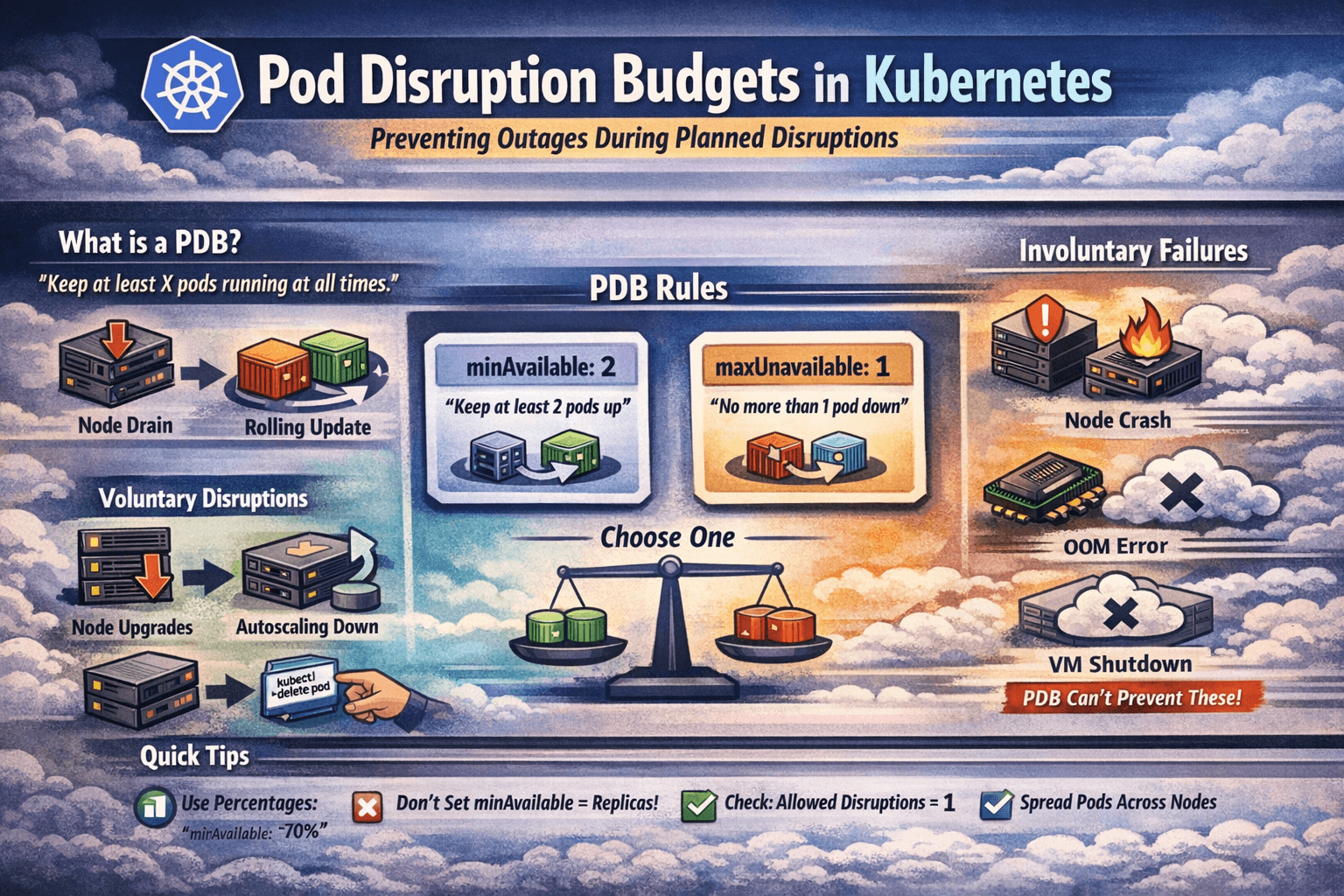
Picture this: it’s a Tuesday afternoon. Your infra team is draining a node for routine maintenance. Looks straightforward. Then your monitoring goes red — every single replica of your payment service got evicted at the same time. Zero pods up. Full outage.
Nobody planned for that. Nobody set any guardrails. And that’s exactly the problem PDB solves.
Pod Disruption Budget is one of those Kubernetes features that most engineers know exists but never actually configure — until they get burned in production. This blog is about not getting burned.
What is a Pod Disruption Budget?
A Pod Disruption Budget (PDB) is a Kubernetes resource that tells the cluster: “No matter what you’re doing — draining nodes, rolling updates, cluster upgrades — you must keep at least X pods of this application running at all times.”
It’s a contract between you and the Kubernetes scheduler. You define the minimum availability. Kubernetes respects it during voluntary disruptions.
The keyword here is voluntary. Let’s get that distinction right first.
Voluntary vs Involuntary Disruptions
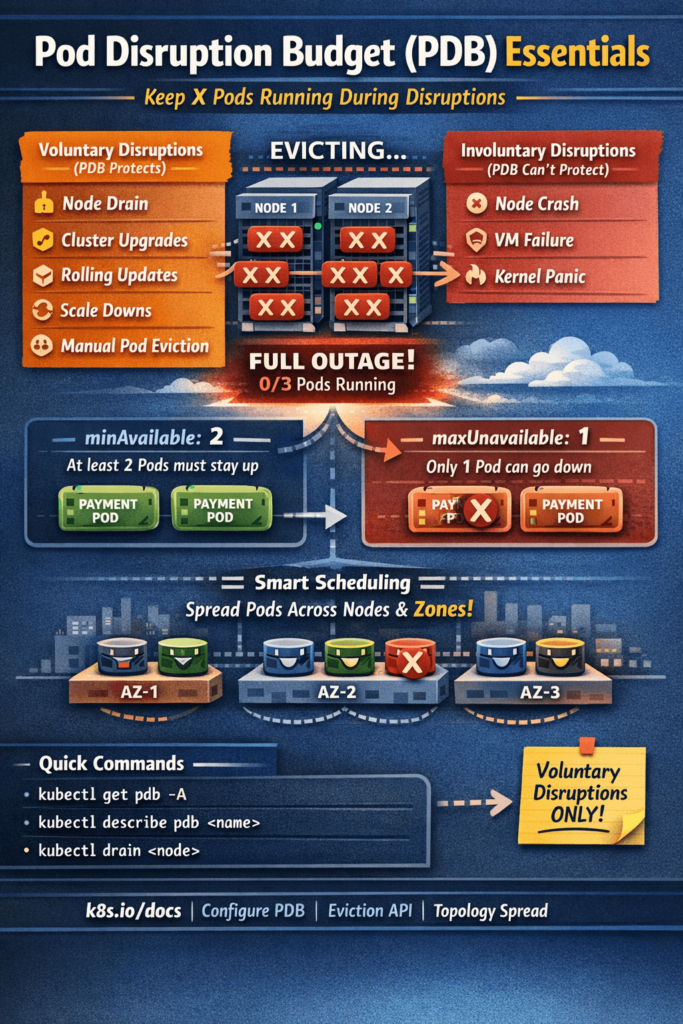
Not all disruptions are equal in Kubernetes. PDB only protects you from voluntary ones.
Voluntary Disruptions (PDB protects against these)
These are planned, intentional actions — usually triggered by a human or an automated system:
- Node drain —
kubectl drain nodeduring maintenance or upgrades - Cluster upgrades — managed Kubernetes (GKE, EKS, AKS) upgrading node pools
- Rolling deployments — Kubernetes evicting old Pods during a new release
- Autoscaler scale-down — Cluster Autoscaler removing underutilized nodes
- Manual pod eviction — someone running
kubectl delete pod
Involuntary Disruptions (PDB does NOT protect against these)
These are unexpected failures — hardware crashes, kernel panics, OOM on the node:
- Node hardware failure
- Cloud provider taking down a VM
- Kernel panic on a node
- OOMKill at the node level
PDB can’t stop a node from suddenly dying. But it can make sure that when your team deliberately takes action on the cluster, your application doesn’t fall over completely.
The Two Ways to Define a PDB
There are exactly two fields you’ll use — and you pick only one of them per PDB:
1. minAvailable — Minimum pods that must stay up
apiVersion: policy/v1
kind: PodDisruptionBudget
metadata:
  name: payment-service-pdb
  namespace: production
spec:
  minAvailable: 2
  selector:
    matchLabels:
      app: payment-service
This says: “At any point during a disruption, at least 2 pods of payment-service must be running.”
If you have 3 replicas, Kubernetes can evict 1 at a time. If you have 2 replicas, Kubernetes cannot evict any — the node drain will block until a pod is rescheduled elsewhere.
2. maxUnavailable — Maximum pods that can be down at once
apiVersion: policy/v1
kind: PodDisruptionBudget
metadata:
  name: frontend-pdb
  namespace: production
spec:
  maxUnavailable: 1
  selector:
    matchLabels:
      app: frontend
This says: “You’re allowed to take down 1 pod at a time. No more.”
If you have 5 replicas, Kubernetes can evict 1, wait for it to reschedule, evict another, and so on. Nice and controlled.
Using Percentages Instead of Hard Numbers
Both fields accept percentages — which is smarter for workloads that autoscale:
spec:
  minAvailable: "70%"   # At least 70% of pods must be up
If you have 10 pods, at least 7 must remain. If autoscaling kicks in and you have 20 pods, at least 14 must remain. The math adjusts automatically. Always prefer percentages for scalable workloads.
A Real Production Scenario
Let me paint a realistic picture. You have a checkout API running with 3 replicas in production. No PDB configured.
Your platform team runs a node upgrade. The upgrade tool drains nodes. Node 1 has all 3 of your pods (it happens — Kubernetes scheduling isn’t always perfectly spread). All 3 get evicted simultaneously. New pods try to schedule on other nodes. Takes 45 seconds. Your checkout API is down for 45 seconds. Orders fail. On-call gets paged.
Now let’s add a PDB:
apiVersion: policy/v1
kind: PodDisruptionBudget
metadata:
  name: checkout-api-pdb
  namespace: production
spec:
  minAvailable: 2
  selector:
    matchLabels:
      app: checkout-api
Same scenario. Node drain starts. Kubernetes checks the PDB before evicting. Sees that evicting more than 1 pod would violate minAvailable: 2. Evicts 1 pod. Waits for it to reschedule on another node and become healthy. Then evicts the next. Checkout API stays up the entire time. Platform team finishes the upgrade. No incident, no page.
That’s the entire value of PDB in one scenario.
How PDB Works Under the Hood
When you run kubectl drain <node>, the drain process doesn’t directly kill pods. It calls the Eviction API for each pod. The Eviction API checks if evicting that pod would violate any active PDB.
Here’s the flow:
kubectl drain node-1
       |
       v
Eviction API called for each Pod on node-1
       |
       v
Kubernetes checks: does this eviction violate any PDB?
       |
    YES → Eviction denied (blocked), drain waits
    NO  → Pod evicted, moves on to next pod
       |
       v
Drain waits and retries until PDB allows eviction
The drain doesn’t fail — it just pauses. It keeps retrying. Once the evicted pod schedules and becomes ready on another node, the PDB condition is satisfied again, and the next pod can be evicted.
This is also why a node drain can sometimes appear to “hang” — a PDB is blocking it because there’s nowhere for the pods to go. If your cluster has no available capacity on other nodes, the drain will wait indefinitely.
Checking PDB Status
# See all PDBs in a namespace
kubectl get pdb -n production

# Detailed view
kubectl describe pdb payment-service-pdb -n production
The output shows something like:
Name:           payment-service-pdb
Namespace:      production
Min available:  2
Selector:       app=payment-service

Status:
    Allowed disruptions:  1
    Current:              3
    Desired:              2
    Total:                3
Key field — Allowed disruptions: This tells you right now, how many pods Kubernetes is allowed to evict. If this is 0, a drain will block. If it’s 1 or more, the drain can proceed one pod at a time.
When debugging a stuck node drain, always check:
kubectl get pdb -A
Look for any PDB with ALLOWED DISRUPTIONS: 0 — that’s your blocker.
Common Mistakes and How to Avoid Them
Mistake 1: Setting minAvailable equal to your replica count
# You have 3 replicas and set this:
spec:
  minAvailable: 3
This means zero disruptions are allowed. Ever. Your node drain will block permanently. The cluster upgrade will never complete. This is an accidental self-inflicted deadlock.
Fix: Always leave room for at least 1 disruption. If you have 3 replicas, set minAvailable: 2 or maxUnavailable: 1.
Mistake 2: PDB with a selector that matches zero pods
spec:
  minAvailable: 2
  selector:
    matchLabels:
      app: my-service   # But the pods are actually labeled app: myservice
Typo in the label. PDB exists but matches nothing. It also doesn’t protect anything. Kubernetes won’t warn you — the PDB is valid YAML, just useless.
Fix: Always verify after creating a PDB:
bashkubectl describe pdb <name> -n <namespace>
# Check "Current" field — should match your replica count
If Current: 0, your selector is wrong.
Mistake 3: Only 1 replica with a PDB
spec:
  minAvailable: 1
With only 1 replica, this means the pod can never be evicted. Node drains will block permanently. You need at least 2 replicas for a PDB to be useful — one stays up while the other gets evicted.
Fix: For critical single-replica workloads, either accept the disruption risk, increase to 2+ replicas, or use minAvailable: 0 (which effectively disables protection but keeps the PDB object for future use).
Mistake 4: No PDB on stateful workloads
StatefulSets — databases, queues, cache clusters — are the most critical workloads to protect. A Postgres primary getting evicted during a node drain while no replica is ready is a data availability nightmare.
Always add PDBs to StatefulSets:
apiVersion: policy/v1
kind: PodDisruptionBudget
metadata:
  name: postgres-pdb
  namespace: production
spec:
  minAvailable: 2    # Keep majority of DB pods alive (for quorum)
  selector:
    matchLabels:
      app: postgres
Mistake 5: Forgetting PDB during Helm deployments
If your app is deployed via Helm, the PDB should be part of the chart — not a manually applied afterthought that gets forgotten. Add it to your Helm chart templates:
templates/
  deployment.yaml
  service.yaml
  pdb.yaml         ← add this
  hpa.yaml
And make it configurable:
# templates/pdb.yaml
{{- if .Values.pdb.enabled }}
apiVersion: policy/v1
kind: PodDisruptionBudget
metadata:
  name: {{ include "myapp.fullname" . }}-pdb
spec:
  minAvailable: {{ .Values.pdb.minAvailable }}
  selector:
    matchLabels:
      {{- include "myapp.selectorLabels" . | nindent 6 }}
{{- end }}
# values.yaml
pdb:
  enabled: true
  minAvailable: 2
PDB with HPA — The Right Combination
If you’re using Horizontal Pod Autoscaler (HPA), use percentages in your PDB instead of hard numbers:
spec:
  minAvailable: "70%"
Why? With HPA, your replica count fluctuates. If HPA scales you down to 2 pods and your PDB says minAvailable: 3, you’ve created a deadlock — Kubernetes can’t evict anything because you already have fewer pods than the minimum.
With minAvailable: "70%", when HPA scales to 2 pods, Kubernetes can still evict up to 1 pod (30%). When it scales to 10 pods, it can evict up to 3. The PDB adapts with the workload.
PDB for Different Workload Types
Here’s a quick reference for how to configure PDBs based on workload type:
Stateless Web Services / APIs
spec:
  maxUnavailable: 1    # One pod down at a time is fine
Critical Payment / Auth Services
spec:
  minAvailable: "80%"  # Keep most pods alive always
Databases / StatefulSets (Odd replicas for quorum)
spec:
  minAvailable: 2      # For 3-replica setup — never lose quorum
Background Workers / Queue Consumers
spec:
  maxUnavailable: 2    # Can afford more disruption, not user-facing
Single-replica Dev/Test workloads
spec:
  maxUnavailable: 1    # Allows disruption, no quorum concern
PDB + Node Affinity + Topology Spread — The Full Stack
PDB is only as effective as your pod scheduling strategy. If all 3 replicas land on the same node, a single node drain evicts all 3 — and the PDB just blocks the drain instead of preventing outage.
Pair PDB with topology spread constraints to ensure pods spread across nodes and availability zones:
spec:
  topologySpreadConstraints:
  - maxSkew: 1
    topologyKey: kubernetes.io/hostname
    whenUnsatisfiable: DoNotSchedule
    labelSelector:
      matchLabels:
        app: payment-service
  - maxSkew: 1
    topologyKey: topology.kubernetes.io/zone
    whenUnsatisfiable: DoNotSchedule
    labelSelector:
      matchLabels:
        app: payment-service
This ensures pods spread evenly across nodes AND across availability zones. Combined with a PDB, node drains can only take down pods from one location at a time — your other zones keep serving traffic.
Quick Reference Cheatsheet
# Create a PDB
kubectl apply -f pdb.yaml

# List all PDBs
kubectl get pdb -A

# Check PDB status (most important: ALLOWED DISRUPTIONS)
kubectl describe pdb <name> -n <namespace>

# Debug a stuck node drain
kubectl get pdb -A | grep " 0 "   # PDBs with 0 allowed disruptions

# Force drain (bypasses PDB — use only in emergency)
kubectl drain <node> --disable-eviction --force --ignore-daemonsets
Warning on
--disable-eviction --force: This bypasses PDB entirely. Use only in genuine emergencies — node is already dead, cluster is stuck. Never use this on healthy nodes as routine maintenance.
PDB vs Pod Anti-Affinity — What’s the Difference?
People sometimes confuse these two. They solve different problems:
| PDB | Pod Anti-Affinity | |
|---|---|---|
| What it does | Controls how many pods can be disrupted at once | Controls where pods are scheduled |
| When it acts | During evictions / disruptions | During scheduling |
| Protects against | Too many pods going down simultaneously | All pods landing on same node |
| Use together? | Yes — they complement each other |
Use both. Anti-affinity spreads your pods. PDB ensures they can’t all be taken down at once. Together, they make your workload genuinely resilient.
Wrapping Up
PDB is a small resource — maybe 10 lines of YAML — but it’s the difference between a smooth cluster upgrade and a production incident.
The key things to remember:
- PDB protects against voluntary disruptions only (drains, upgrades, autoscaler scale-down)
- Use
minAvailablewhen you care about absolute minimum — usemaxUnavailablewhen you care about disruption rate - Use percentages if you’re running HPA
- Never set
minAvailableequal to your total replica count — that’s a deadlock - Always verify the selector matches actual pods after creating a PDB
- Pair PDB with topology spread constraints for real multi-zone resilience
- Make PDB part of your Helm charts — not a manual step
The next time your platform team says “we’re draining nodes for the cluster upgrade tonight”, you’ll sleep easy knowing your PDB has it covered.
Reference Links
| Topic | Link |
|---|---|
| Pod Disruption Budget — Official Docs | https://kubernetes.io/docs/concepts/workloads/pods/disruptions/ |
| Configure PDB | https://kubernetes.io/docs/tasks/run-application/configure-pdb/ |
| Eviction API | https://kubernetes.io/docs/concepts/scheduling-eviction/api-eviction/ |
| Topology Spread Constraints | https://kubernetes.io/docs/concepts/scheduling-eviction/topology-spread-constraints/ |
| Cluster Autoscaler & PDB | https://github.com/kubernetes/autoscaler/blob/master/cluster-autoscaler/FAQ.md |