
Introduction
SeaweedFS is a distributed object store and file system that can expose an S3-compatible API. It is useful when you want to replace MinIO with lighter self-hosted object storage for applications such as photo backups, static hosting, or internal services that expect S3.
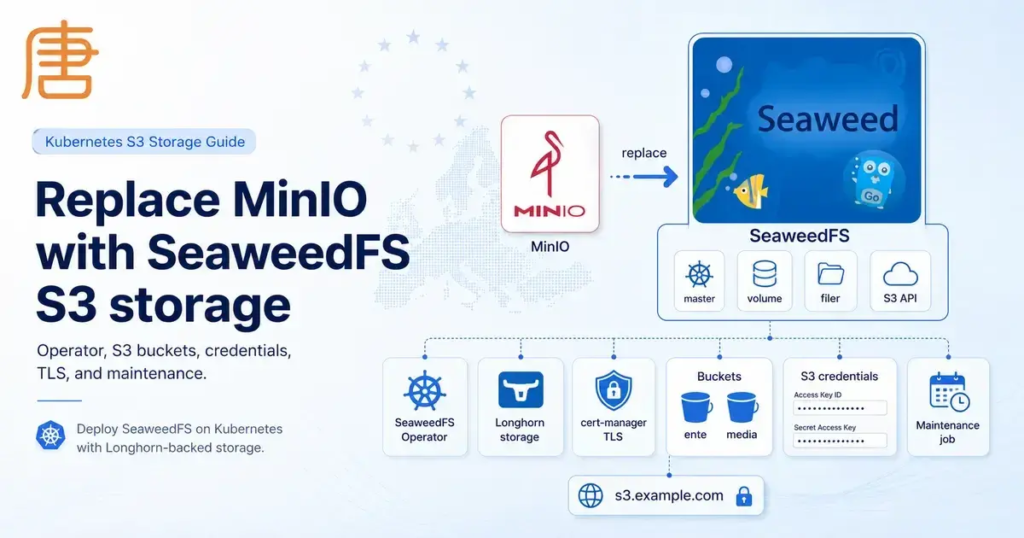
The reason to move away from MinIO is simple: the public minio/minio repository is archived and read-only, so I treat it as no longer maintained for new self-hosted deployments. SeaweedFS gives me an S3-compatible replacement that still fits well into Kubernetes and GitOps.
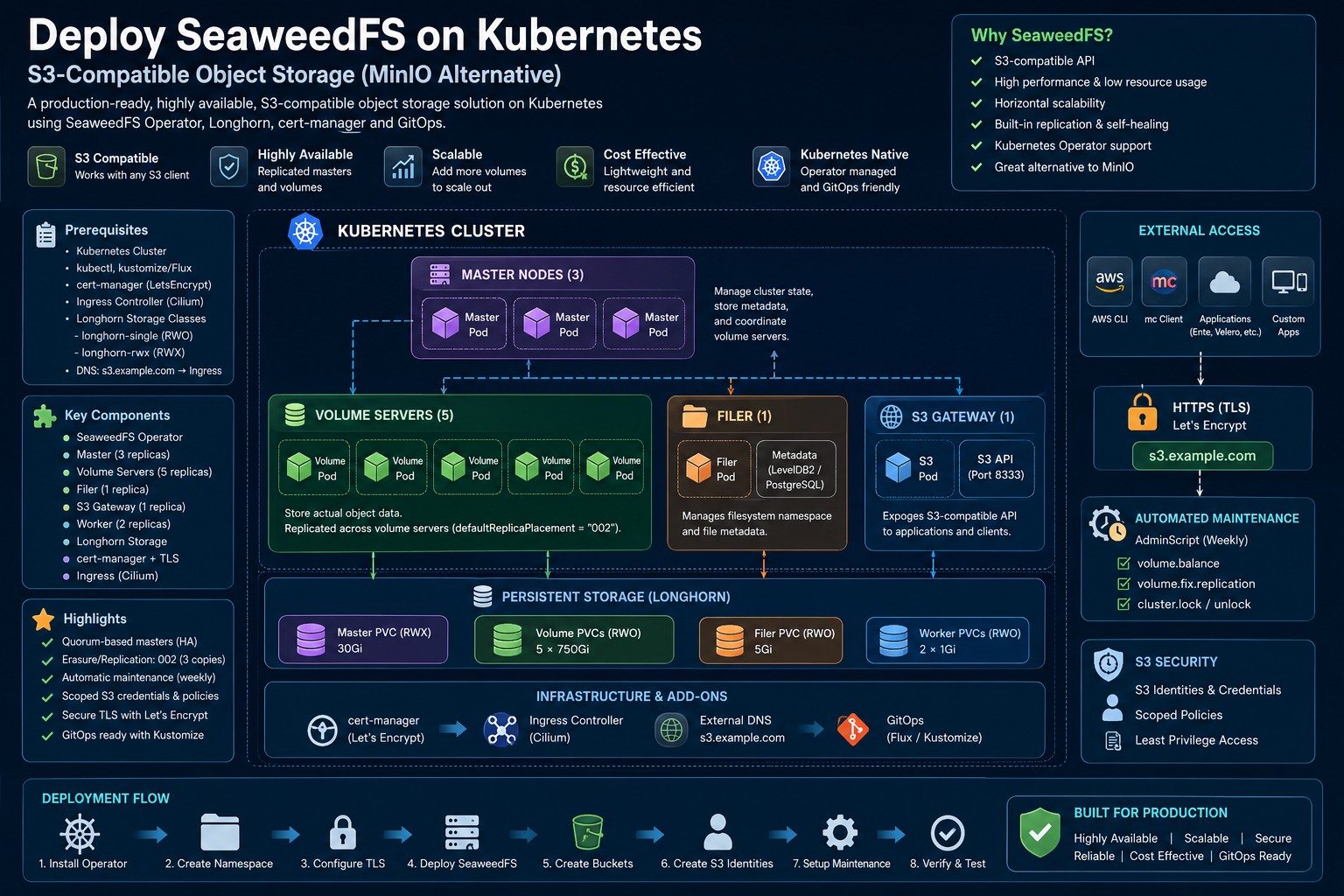
In this guide, we will deploy SeaweedFS on Kubernetes with the SeaweedFS operator, Longhorn-backed persistent volumes, cert-manager TLS, an external S3 endpoint, buckets, scoped S3 credentials, and a weekly maintenance job.
The SeaweedFS Kubernetes setup below is designed for a small/medium production cluster where applications need a private S3-compatible storage service.
The setup uses the SeaweedFS custom resources directly instead of a large values file. That makes the moving pieces explicit: Seaweed, Bucket, S3Identity, S3Credentials, S3Policy, S3PolicyBinding, and AdminScript.
Prerequisites
- A running Kubernetes cluster
kubectlaccess to the cluster- Kustomize support through
kubectl apply -kor Flux - cert-manager with a
ClusterIssuernamedletsencrypt - An Ingress controller (the example uses
cilium) - A storage class for SeaweedFS data volumes (the example uses
longhorn-single) - A ReadWriteMany storage class for the master metadata PVC (the example uses
longhorn-rwx) - DNS pointing
s3.example.comto your Ingress endpoint - Sealed Secrets and
kubesealif you want to seal database credentials for an external filer metadata store
Step-by-Step Guide
Create a Working Directory
mkdir -p seaweed
cd seaweed
Install the SeaweedFS Operator
The Seaweed and S3 custom resources used later are reconciled by this operator.
Using Flux:
apiVersion: v1
kind: Namespace
metadata:
  name: seaweedfs-operator
---
apiVersion: source.toolkit.fluxcd.io/v1
kind: HelmRepository
metadata:
  name: seaweedfs-operator
  namespace: seaweedfs-operator
spec:
  interval: 1h
  url: https://seaweedfs.github.io/seaweedfs-operator/
---
apiVersion: helm.toolkit.fluxcd.io/v2
kind: HelmRelease
metadata:
  name: seaweedfs-operator
  namespace: seaweedfs-operator
spec:
  interval: 1h
  chart:
    spec:
      chart: seaweedfs-operator
      version: '0.1.36'
      sourceRef:
        kind: HelmRepository
        name: seaweedfs-operator
        namespace: seaweedfs-operator
If you are not using Flux, install the operator with Helm instead:
helm repo add seaweedfs-operator https://seaweedfs.github.io/seaweedfs-operator/
helm repo update
helm upgrade --install seaweedfs-operator seaweedfs-operator/seaweedfs-operator \
  --namespace seaweedfs-operator \
  --create-namespace \
  --version 0.1.36
Create namespace.yaml
apiVersion: v1
kind: Namespace
metadata:
  name: seaweed
Create cert.yaml
This certificate is used by the S3 Ingress:
apiVersion: cert-manager.io/v1
kind: Certificate
metadata:
  name: seaweed
  namespace: seaweed
spec:
  secretName: seaweed-tls
  issuerRef:
    name: letsencrypt
    kind: ClusterIssuer
  dnsNames:
    - s3.example.com
Create seaweed.yaml
This manifest defines the SeaweedFS cluster itself:
apiVersion: seaweed.seaweedfs.com/v1
kind: Seaweed
metadata:
  name: seaweedfs
  namespace: seaweed
spec:
  image: chrislusf/seaweedfs:4.40
  volumeServerDiskCount: 1

  master:
    replicas: 3
    affinity:
      podAntiAffinity:
        requiredDuringSchedulingIgnoredDuringExecution:
          - labelSelector:
              matchExpressions:
                - key: app.kubernetes.io/component
                  operator: In
                  values:
                    - master
                - key: app.kubernetes.io/instance
                  operator: In
                  values:
                    - seaweedfs
            topologyKey: kubernetes.io/hostname
    volumes:
      - name: master-data
        persistentVolumeClaim:
          claimName: seaweedfs-master-data
    volumeMounts:
      - name: master-data
        mountPath: /data
    extraArgs:
      - -mdir=/data/$POD_NAME
    volumeSizeLimitMB: 1024

  volume:
    storageClassName: longhorn-single
    replicas: 5
    affinity:
      podAntiAffinity:
        requiredDuringSchedulingIgnoredDuringExecution:
          - labelSelector:
              matchExpressions:
                - key: app.kubernetes.io/component
                  operator: In
                  values:
                    - volume
                - key: app.kubernetes.io/instance
                  operator: In
                  values:
                    - seaweedfs
            topologyKey: kubernetes.io/hostname
    requests:
      storage: 750Gi

  filer:
    replicas: 1
    persistence:
      enabled: true
      storageClassName: longhorn
      resources:
        requests:
          storage: 5Gi
    config: |
      [filer.options]
      defaultReplicaPlacement = "002"

      [leveldb2]
      enabled = true
      dir = "/data/filerldb2"

  s3:
    replicas: 1
    ingress:
      enabled: true
      className: cilium
      host: s3.example.com
      tls:
        - hosts:
            - s3.example.com
          secretName: seaweed-tls

  admin: {}

  worker:
    replicas: 2
    jobType: "all"
    maxExecute: 4
    persistence:
      enabled: true
      resources:
        requests:
          storage: 1Gi
---
apiVersion: v1
kind: PersistentVolumeClaim
metadata:
  name: seaweedfs-master-data
  namespace: seaweed
spec:
  accessModes:
    - ReadWriteMany
  storageClassName: longhorn-rwx
  resources:
    requests:
      storage: 30Gi
The important values are:
master.replicas: 3gives the cluster a quorum-based control planevolume.replicas: 5creates five volume-server podsvolume.requests.storage: 750Giis the size of each volume server PVCdefaultReplicaPlacement = "002"makes new writes use three copiess3.ingress.hostexposes the S3 API outside the clusterNote: This example usesleveldb2for filer metadata. That is simple, but it is local to the filer pod. For a highly available filer metadata store, use PostgreSQL, MySQL, Redis, or another external metadata backend supported by SeaweedFS.
If you want to use MySQL or Galera for filer metadata, create a sealed database secret first:
export MYSQL_PASSWORD=FROM_DATABASE_SECRET
kubectl -n seaweed create secret generic seaweedfs-db-secret \
  --from-literal=user=seaweed \
  --from-literal=password=$MYSQL_PASSWORD \
  --dry-run=client -o yaml | kubeseal --format yaml > seaweedfs-db-secret.yaml
Then update the filer config in seaweed.yaml to use your external metadata store instead of leveldb2.
Create buckets.yaml
This creates a few buckets:
apiVersion: seaweed.seaweedfs.com/v1
kind: Bucket
metadata:
  name: ente
  namespace: seaweed
spec:
  clusterRef:
    name: seaweedfs
    namespace: seaweed
---
apiVersion: seaweed.seaweedfs.com/v1
kind: Bucket
metadata:
  name: media
  namespace: seaweed
spec:
  clusterRef:
    name: seaweedfs
    namespace: seaweed
Create an Admin S3 Identity in seaweed.creds.yaml
This identity can access every bucket:
apiVersion: seaweed.seaweedfs.com/v1
kind: S3Identity
metadata:
  name: seaweed
  namespace: seaweed
spec:
  seaweedRef:
    name: seaweedfs
---
apiVersion: seaweed.seaweedfs.com/v1
kind: S3Credentials
metadata:
  name: seaweed-creds
  namespace: seaweed
spec:
  seaweedRef:
    name: seaweedfs
  identityRef:
    name: seaweed
  secretRef:
    name: seaweed-s3-secret
---
apiVersion: seaweed.seaweedfs.com/v1
kind: S3Policy
metadata:
  name: rw-all
  namespace: seaweed
spec:
  seaweedRef:
    name: seaweedfs
  statements:
    - effect: Allow
      actions:
        - "*"
      resources:
        - "*"
---
apiVersion: seaweed.seaweedfs.com/v1
kind: S3PolicyBinding
metadata:
  name: seaweed-binding
  namespace: seaweed
spec:
  seaweedRef:
    name: seaweedfs
  policyRef:
    name: rw-all
  subjects:
    - kind: S3Identity
      name: seaweed
Create an Application-Scoped Identity in app.creds.yaml
This identity can only access the ente bucket:
apiVersion: seaweed.seaweedfs.com/v1
kind: S3Identity
metadata:
  name: ente
  namespace: seaweed
spec:
  seaweedRef:
    name: seaweedfs
---
apiVersion: seaweed.seaweedfs.com/v1
kind: S3Credentials
metadata:
  name: ente-creds
  namespace: seaweed
spec:
  seaweedRef:
    name: seaweedfs
  identityRef:
    name: ente
  secretRef:
    name: ente-s3-secret
---
apiVersion: seaweed.seaweedfs.com/v1
kind: S3Policy
metadata:
  name: rw-ente
  namespace: seaweed
spec:
  seaweedRef:
    name: seaweedfs
  statements:
    - effect: Allow
      actions:
        - "*"
      resources:
        - ente
        - ente/*
---
apiVersion: seaweed.seaweedfs.com/v1
kind: S3PolicyBinding
metadata:
  name: ente-binding
  namespace: seaweed
spec:
  seaweedRef:
    name: seaweedfs
  policyRef:
    name: rw-ente
  subjects:
    - kind: S3Identity
      name: ente
The operator writes the generated access key and secret key into ente-s3-secret. Use that Secret when configuring applications such as Ente Photos.
Create admin.yaml
This runs a weekly balance and replication repair through weed shell:
apiVersion: seaweed.seaweedfs.com/v1
kind: AdminScript
metadata:
  name: weekly-balance
  namespace: seaweed
spec:
  clusterRef:
    name: seaweedfs
  schedule: "0 2 * * 1"
  script: |
    lock
    volume.balance -force
    volume.fix.replication
    unlock
Create kustomization.yaml
apiVersion: kustomize.config.k8s.io/v1beta1
kind: Kustomization
resources:
  - admin.yaml
  - buckets.yaml
  - cert.yaml
  - namespace.yaml
  - seaweed.yaml
  - seaweed.creds.yaml
  - app.creds.yaml
Deploy SeaweedFS
kubectl apply -k .Verify the Operator Reconciled the Cluster
kubectl -n seaweed get seaweed
kubectl -n seaweed get pods
kubectl -n seaweed get pvc
kubectl -n seaweed get ingress
kubectl -n seaweed get buckets
kubectl -n seaweed get s3identities,s3credentials,s3policies,s3policybindings
Check Generated S3 Credentials
kubectl -n seaweed get secret seaweed-s3-secret -o yaml
kubectl -n seaweed get secret ente-s3-secret -o yaml
Test the S3 Endpoint with an S3 Client
Export the generated keys from the Secret, then point the client at your S3 host:
export AWS_ACCESS_KEY_ID=REPLACE_WITH_ACCESS_KEY
export AWS_SECRET_ACCESS_KEY=REPLACE_WITH_SECRET_KEY
export AWS_EC2_METADATA_DISABLED=true

aws --endpoint-url https://s3.example.com s3 ls
aws --endpoint-url https://s3.example.com s3 cp ./test.txt s3://ente/test.txt
aws --endpoint-url https://s3.example.com s3 rm s3://ente/test.txt
Conclusion
You now have SeaweedFS running on Kubernetes with:
- Persistent Longhorn storage
- A public S3 endpoint
- cert-manager TLS
- Managed buckets
- Scoped S3 credentials
- Lifecycle rules
- A scheduled maintenance script
Before storing important data, test uploads and downloads, check replication with volume.fix.replication, and make sure your backup plan covers both the object data and the filer metadata backend.