
Role‑Based Access Control (RBAC) is one of the most critical security layers in any Kubernetes cluster because it decides who can perform which actions on which resources. In many organizations, RBAC is the difference between “one compromised account destroys the cluster” and “blast radius is limited to a small, controlled scope.”
This blog will take you from fundamentals to real‑world patterns with detailed YAML, commands, and best practices. We will also connect the conceptual view (“assign permissions to roles, not users”) to actual Kubernetes objects, building on ideas like those often shared in LinkedIn explainers about assigning permissions by role rather than by individual user accounts.
1. RBAC Basics: Assign Permissions to Roles, Not Users
At a high level, RBAC is a model where permissions are attached to roles, and users (or other identities) are attached to those roles. In Kubernetes, the same principle applies:
- A role groups a set of allowed actions.
- A binding attaches that role to identities (users, groups, or service accounts).
This gives you several advantages:
- Centralized permission management: change the role once instead of updating many users.
- Least privilege: roles can be tightly scoped per job function or application.
- Easier audits: “Which roles exist?” and “Who is bound to which role?” are answerable via the API and
kubectl.
When people talk about “RBAC: assign permissions by role, not user” (as in the LinkedIn style content your link points to), they are referring to exactly this indirection: permissions → roles → users.
2. How Kubernetes Authorization Works Under the Hood
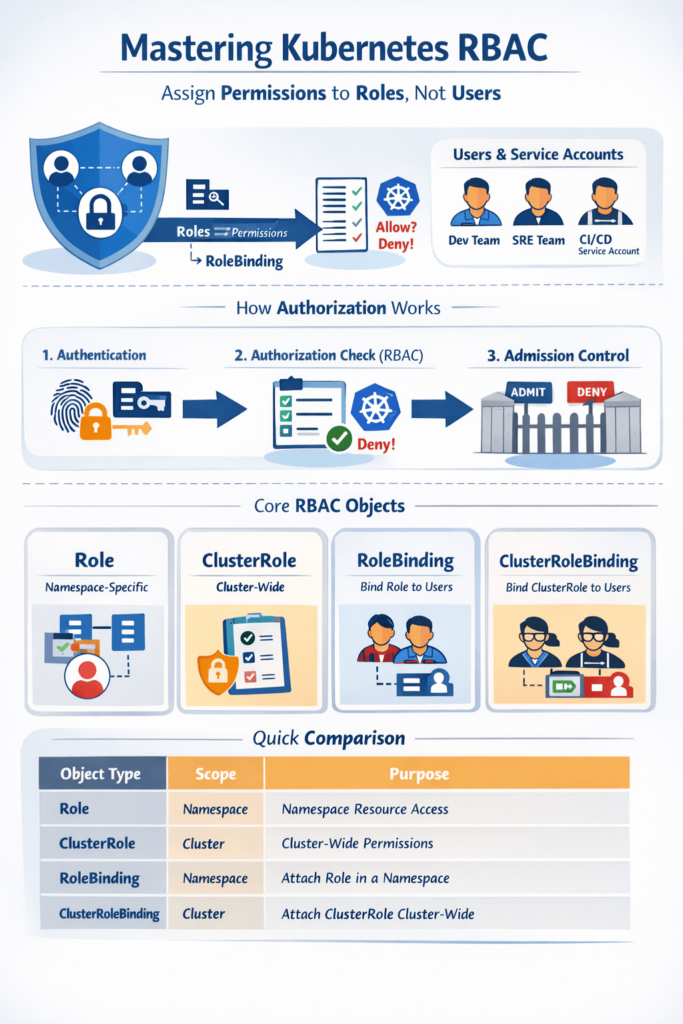
Before RBAC rules are applied, the Kubernetes API server goes through several steps for every request.
- Authentication
The API server verifies who you are, using mechanisms such as client certificates, bearer tokens, OIDC, or service account tokens. - Authorization (RBAC is one mode)
After the identity is known, Kubernetes checks if the identity is allowed to perform the requested action on the target resource. - Admission control
Even if authorization passes, admission controllers can still deny or modify the request, for example enforcing PodSecurity standards or mutating fields.
For RBAC, the API server evaluates:
userandgroups(for humans) orsystem:serviceaccount:<ns>:<name>(for service accounts).- requested verb (e.g.,
get,list,watch,create,update,patch,delete). - resource and API group (e.g.,
podsin"",deploymentsinapps,cronjobsinbatch). - optional resourceName when rules target specific objects.
If at least one applicable role rule grants the requested verb on that resource in that namespace (or cluster‑wide), the request is allowed; otherwise, it’s forbidden.
3. RBAC Objects in Kubernetes: Detailed View
Kubernetes defines RBAC in the rbac.authorization.k8s.io/v1 API group via four core objects.
3.1 Role (namespaced)
A Role is namespaced and defines permissions that are valid only inside that namespace.
Key fields inside rules:
apiGroups: list of API groups (e.g.,[""],["apps"]).resources: list of resource types (["pods"],["deployments"]).verbs: list of actions (["get", "list", "watch"]).resourceNames(optional): restricts permissions to specific object names.
Example: Read‑only Pods and ConfigMaps in dev namespace
apiVersion: rbac.authorization.k8s.io/v1
kind: Role
metadata:
  name: dev-readonly
  namespace: dev
rules:
  - apiGroups: [""]
    resources: ["pods", "configmaps"]
    verbs: ["get", "list", "watch"]
This Role does not allow create, update, or delete, making it safe for read‑only access within dev.
3.2 ClusterRole (cluster‑scoped / reusable)
A ClusterRole is cluster‑scoped and is not bound to a particular namespace. Use it for:
- Cluster‑wide permissions across all namespaces.
- Non‑namespaced resources (
nodes,namespaces,persistentvolumes, etc.). - Reusable roles that you later bind into specific namespaces using RoleBindings.
Example: Cluster‑wide node and namespace read access
apiVersion: rbac.authorization.k8s.io/v1
kind: ClusterRole
metadata:
  name: infrastructure-reader
rules:
  - apiGroups: [""]
    resources: ["nodes", "namespaces", "persistentvolumes"]
    verbs: ["get", "list", "watch"]
You can reuse this ClusterRole in multiple bindings instead of duplicating rules.
3.3 RoleBinding (namespaced binding)
A RoleBinding attaches a Role or ClusterRole to subjects in a single namespace.
Subjects can be:
User– a user identity that your auth provider maps.Group– often better for teams and departments.ServiceAccount– for in‑cluster workloads.
Example: Bind dev-readonly Role to a developer group in dev
apiVersion: rbac.authorization.k8s.io/v1
kind: RoleBinding
metadata:
  name: dev-readonly-binding
  namespace: dev
subjects:
  - kind: Group
    name: dev-team
    apiGroup: rbac.authorization.k8s.io
roleRef:
  kind: Role
  name: dev-readonly
  apiGroup: rbac.authorization.k8s.io
Everyone in dev-team now has read‑only access to Pods and ConfigMaps in dev, but nowhere else.
You can also bind a ClusterRole with a RoleBinding, but the binding remains restricted to that namespace.
3.4 ClusterRoleBinding (cluster‑wide binding)
A ClusterRoleBinding attaches a ClusterRole to subjects at the cluster scope, affecting all namespaces.
Example: Give all SREs read access across the cluster
apiVersion: rbac.authorization.k8s.io/v1
kind: ClusterRoleBinding
metadata:
  name: sre-view-all
subjects:
  - kind: Group
    name: sre-team
    apiGroup: rbac.authorization.k8s.io
roleRef:
  kind: ClusterRole
  name: infrastructure-reader
  apiGroup: rbac.authorization.k8s.io
This pattern maps well to security content that emphasizes least privilege and role‑centric permissioning, like the RBAC explanations commonly shared on LinkedIn.
4. RBAC Examples for Common DevOps Use Cases
4.1 Developer full control in their namespace
Goal: allow a dev team to manage everything in its own namespace, but nothing outside it.
apiVersion: rbac.authorization.k8s.io/v1
kind: Role
metadata:
  name: dev-namespace-admin
  namespace: dev
rules:
  - apiGroups: ["", "apps", "batch"]
    resources: ["pods", "deployments", "statefulsets", "jobs", "cronjobs", "services", "configmaps", "secrets"]
    verbs: ["get", "list", "watch", "create", "update", "patch", "delete"]
Bind it:
apiVersion: rbac.authorization.k8s.io/v1
kind: RoleBinding
metadata:
  name: dev-namespace-admin-binding
  namespace: dev
subjects:
  - kind: Group
    name: dev-team
    apiGroup: rbac.authorization.k8s.io
roleRef:
  kind: Role
  name: dev-namespace-admin
  apiGroup: rbac.authorization.k8s.io
4.2 Read‑only production access for auditors
Goal: allow SREs or auditors to inspect everything in prod without modifying anything.
apiVersion: rbac.authorization.k8s.io/v1
kind: Role
metadata:
  name: prod-readonly
  namespace: prod
rules:
  - apiGroups: ["", "apps", "batch"]
    resources: ["*"]
    verbs: ["get", "list", "watch"]
Bind to a read‑only group:
apiVersion: rbac.authorization.k8s.io/v1
kind: RoleBinding
metadata:
  name: prod-readonly-binding
  namespace: prod
subjects:
  - kind: Group
    name: prod-readonly
    apiGroup: rbac.authorization.k8s.io
roleRef:
  kind: Role
  name: prod-readonly
  apiGroup: rbac.authorization.k8s.io
4.3 CI/CD service account with minimal deploy rights
Goal: your pipeline should only be able to deploy and update workloads, not read secrets from other namespaces.
apiVersion: v1
kind: ServiceAccount
metadata:
  name: ci-deployer
  namespace: staging
---
apiVersion: rbac.authorization.k8s.io/v1
kind: Role
metadata:
  name: ci-deployer-role
  namespace: staging
rules:
  - apiGroups: ["apps"]
    resources: ["deployments"]
    verbs: ["get", "list", "watch", "create", "update", "patch"]
  - apiGroups: [""]
    resources: ["services", "configmaps"]
    verbs: ["get", "list", "watch", "create", "update", "patch"]
Bind the role:
apiVersion: rbac.authorization.k8s.io/v1
kind: RoleBinding
metadata:
  name: ci-deployer-binding
  namespace: staging
subjects:
  - kind: ServiceAccount
    name: ci-deployer
    namespace: staging
roleRef:
  kind: Role
  name: ci-deployer-role
  apiGroup: rbac.authorization.k8s.io
The pipeline can now deploy to staging but cannot, for example, access secrets in prod.
5. Checking and Debugging Permissions
5.1 kubectl auth can-i
This command is your best friend when validating RBAC.
kubectl auth can-i create pods --namespace dev
kubectl auth can-i delete secrets --namespace prod
Simulate another identity:
kubectl auth can-i get deployments \
  --as system:serviceaccount:staging:ci-deployer \
  --namespace staging
If it returns no, inspect relevant Roles and Bindings using kubectl describe.
5.2 Typical “forbidden” debugging flow
- Capture the exact error: resource, verb, namespace.
- Check whether the identity is a user or service account.
- List RoleBindings and ClusterRoleBindings involving that subject or its groups.
- Confirm API group and resource names are correct (
podsin core,deploymentsinapps). - Adjust the role and re‑apply with
kubectl apply.
6. Best Practices for Production‑Grade RBAC
Security guides and the Kubernetes docs emphasize several best practices that align strongly with industry posts on least privilege and controlled access.
- Enforce least privilege
Start with minimal verbs and resources; avoid*for both unless absolutely required. - Prefer namespace‑scoped Roles
Use Roles where possible and reserve ClusterRoles for cluster‑level duties or non‑namespaced resources. - Use groups and service accounts, not individual users
Manage people at the IdP level (e.g., Azure AD, Google Workspace) by group membership, then bind groups and service accounts in Kubernetes. - Limit
cluster-adminusage
Treatcluster-adminas an emergency or platform‑ops‑only role; never bind it broadly, especially not to CI/CD service accounts. - Review and audit regularly
- List and review all ClusterRoleBindings and high‑privilege Roles.
- Use audit logs and third‑party tools to detect over‑permissive bindings.
- Model permissions from real personas
Define roles for “Dev in team A”, “SRE read‑only prod”, “Ops on infra resources”, “CI deployer”, etc., and keep each role focused. - Test changes safely
Try new roles in lower environments first, then promote them, similar to how you promote application manifests.
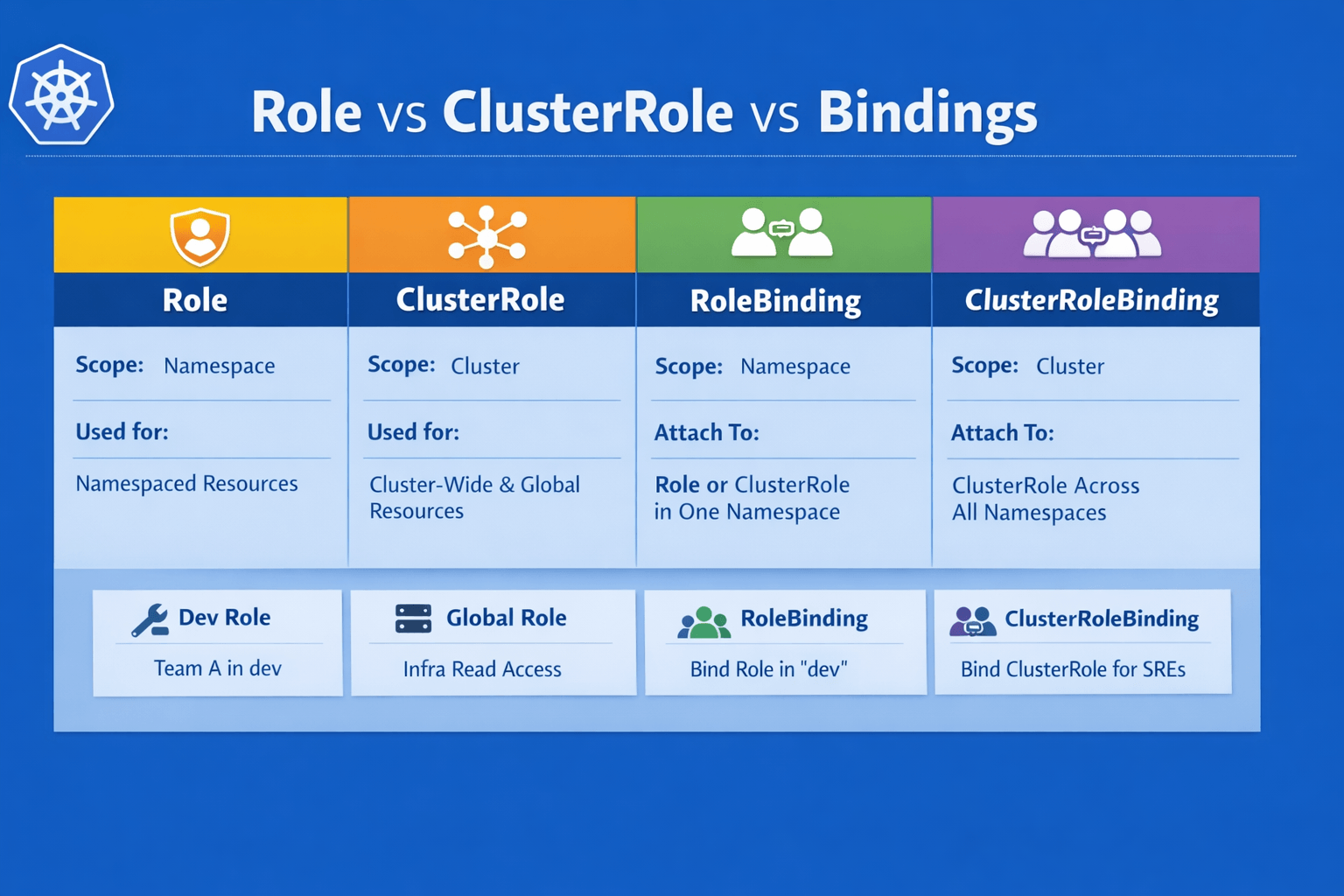
7. Quick Comparison: Role vs ClusterRole vs Bindings
| Object type | Scope | Used for |
|---|---|---|
| Role | Namespace | Namespaced resources in a single namespace. |
| ClusterRole | Cluster | Cluster‑wide or non‑namespaced resources; reusable roles. |
| RoleBinding | Namespace | Attach Role/ClusterRole to subjects in one namespace. |
| ClusterRoleBinding | Cluster | Attach ClusterRole to subjects across all namespaces. |