

If you’re preparing for a DevOps or Kubernetes interview, there’s one question you simply cannot afford to get wrong:
“How does a Kubernetes Ingress Controller work?”
Surprisingly, many candidates misunderstand this — mainly because they lack clarity on two foundational concepts:
- Ingress Resource → stores routing rules
- Ingress Controller → executes routing using those rules
This blog will simplify these concepts with diagrams, examples, and clear explanations.
🌐 What is Kubernetes Ingress?
In plain English, Ingress means entering — and that’s exactly what it means in Kubernetes too.
- Ingress → traffic entering the cluster
- Egress → traffic leaving the cluster
In Kubernetes, Ingress is a native resource, just like Deployments, Services, or Pods. You use it to define DNS-based routing rules for external traffic.
However…
⚠️ Ingress alone does NOT route traffic.
It only stores the rules.
You need an Ingress Controller to actually perform routing.
🚫 Before Kubernetes Ingress (The Old Way)
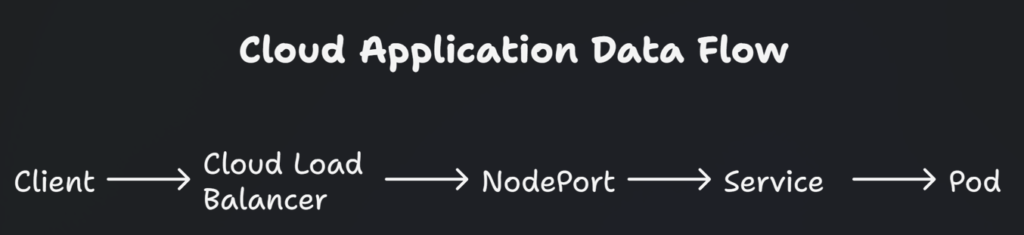
Before Ingress existed, exposing an app externally meant using:
Service → Type: LoadBalancer
Every application needed its own LoadBalancer — costly, inefficient, and difficult to manage.
Example (without Ingress):
To update routing, people relied on:
- Nginx deployment + configmaps
- HAProxy deployment + configmaps
- Consul-based service discovery
- Reloading proxy configs manually
Ingress standardized all of this.
🌉 Ingress vs. Ingress Controller (The Core Confusion)
This is where 90% of beginners get stuck.
📌 Ingress Resource
Stores DNS routing rules in etcd.
Example:
apiVersion: networking.k8s.io/v1kind: Ingressmetadata:name: test-ingressnamespace: devspec:rules:- host: test.apps.example.com
    http:
      paths:
      - path: /
        pathType: Prefix
        backend:
          service:
            name: hello-service
            port:
              number: 80
This means:
All traffic to
test.apps.example.comshould go to thehello-servicein thedevnamespace.
📌 Ingress Controller
A reverse proxy running inside your cluster (like Nginx, HAProxy, Traefik).
It does the actual work:
- Reads ingress objects
- Generates routing configurations
- Reloads proxy dynamically
- Routes traffic from LoadBalancer → services
The Important Note:
External traffic never hits the Ingress Resource.
It hits the Ingress Controller service (usually LoadBalancer).
🏗️ High-Level Traffic Flow Using Ingress
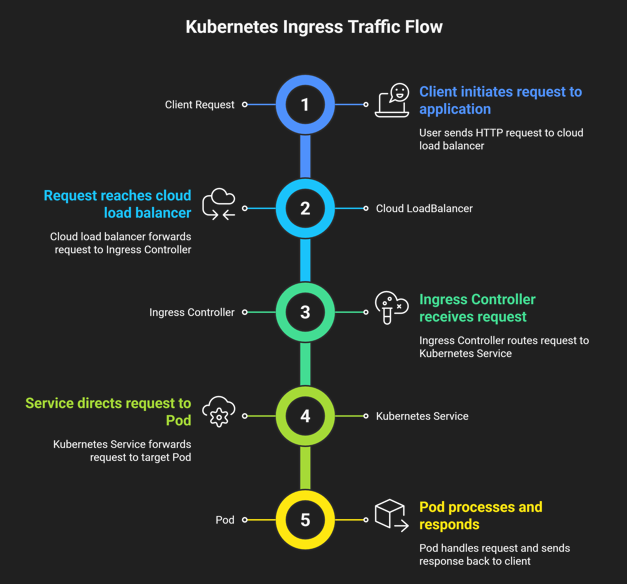
Cloud providers differ slightly:
- AWS ALB acts as the ingress controller
- GKE Ingress creates a Google HTTPS LoadBalancer
- Azure AGIC uses Application Gateway
🔧 How Kubernetes Ingress Controller Works (Step-by-Step)
Let’s understand this using the Nginx Ingress Controller, the most widely used option.
📌 1. Nginx Pod starts with a templated nginx.conf
Inside the controller pod, a Lua-based template is used.
It can communicate with the Kubernetes API server.
📌 2. Nginx Controller watches for Ingress objects
The controller continuously checks for:
- New ingress objects
- Modified ingress objects
- Deleted ingress objects
📌 3. It generates routing configs in /etc/nginx/conf.d/
For every ingress rule, Nginx generates something like:
server {
    server_name test.apps.example.com;
    location / {
        proxy_pass http://hello-service.dev.svc.cluster.local:80;
    }
}
📌 4. Main nginx.conf includes these configs
Something like:
include /etc/nginx/conf.d/*.conf;
📌 5. On changes → Nginx reloads gracefully
There is no downtime.
If you exec into the controller pod:
kubectl exec -it <nginx-pod> -- cat /etc/nginx/nginx.conf
…you can see all the routing rules generated from your ingress YAML.
🧩 Ingress & Ingress Controller Architecture (Explained)
Here’s the architecture in words:
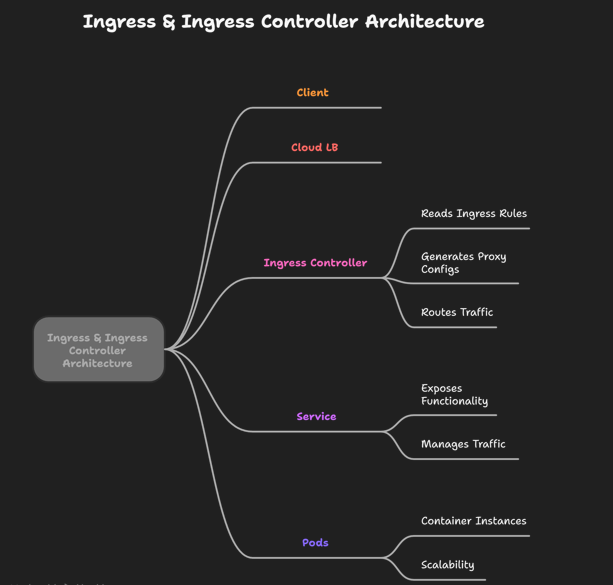
Example scenario:
/pay→ payment service/auth→ authentication service
Both can live inside one Ingress object.
📚 List of Popular Kubernetes Ingress Controllers
Here are the commonly used controllers:
⭐ Open-Source
- Nginx Ingress Controller (Community)
- Nginx Ingress Controller (NGINX Inc – paid/enterprise)
- Traefik
- HAProxy
- Contour
- Istio Gateway (via Gateway API)
⭐ Cloud Vendor Controllers
- AWS ALB Ingress Controller
- GCP Ingress (HTTP(S) Load Balancer)
- Azure AGIC (Application Gateway Ingress Controller)
🚀 Deploy Your First Ingress Controller
If you want to practice:
🔗 Use this guide: Nginx Ingress Controller Setup (Beginner Friendly)
(I can create a fresh one for you if you want.)
It will cover:
- Deployment
- Admission controllers
- Path routing
- TLS setup
- Examples with manifests
Just tell me “create setup guide” and I’ll generate it.
? Kubernetes Ingress FAQs
Is Ingress a load balancer?
No.
Ingress only stores routing rules.
Ingress Controller acts like the load balancer.
Why do we need an Ingress Controller?
Because Ingress object alone does nothing.
The controller performs routing.
What’s the difference between Ingress and Nginx?
- Ingress → Kubernetes object
- Nginx → Reverse proxy used as a controller
Can ingress do path-based routing?
Yes.
A single ingress can route:
/pay→ payment service/auth→ auth service
Does ingress support TLS?
Yes.
Certificate is stored in a secret and referenced in the ingress object.
🏁 Conclusion
In this guide, you learned:
- What Ingress is
- How Ingress Controller works
- Why both are required
- How Nginx dynamically generates routing configs
- How traffic flows through the cluster
- Popular ingress controller options
Understanding this deeply is crucial for:
- Kubernetes interviews
- Production cluster setup
- Cloud-native architecture
The next evolution of Ingress is the Gateway API, which offers a more flexible and modern approach to traffic routing.