
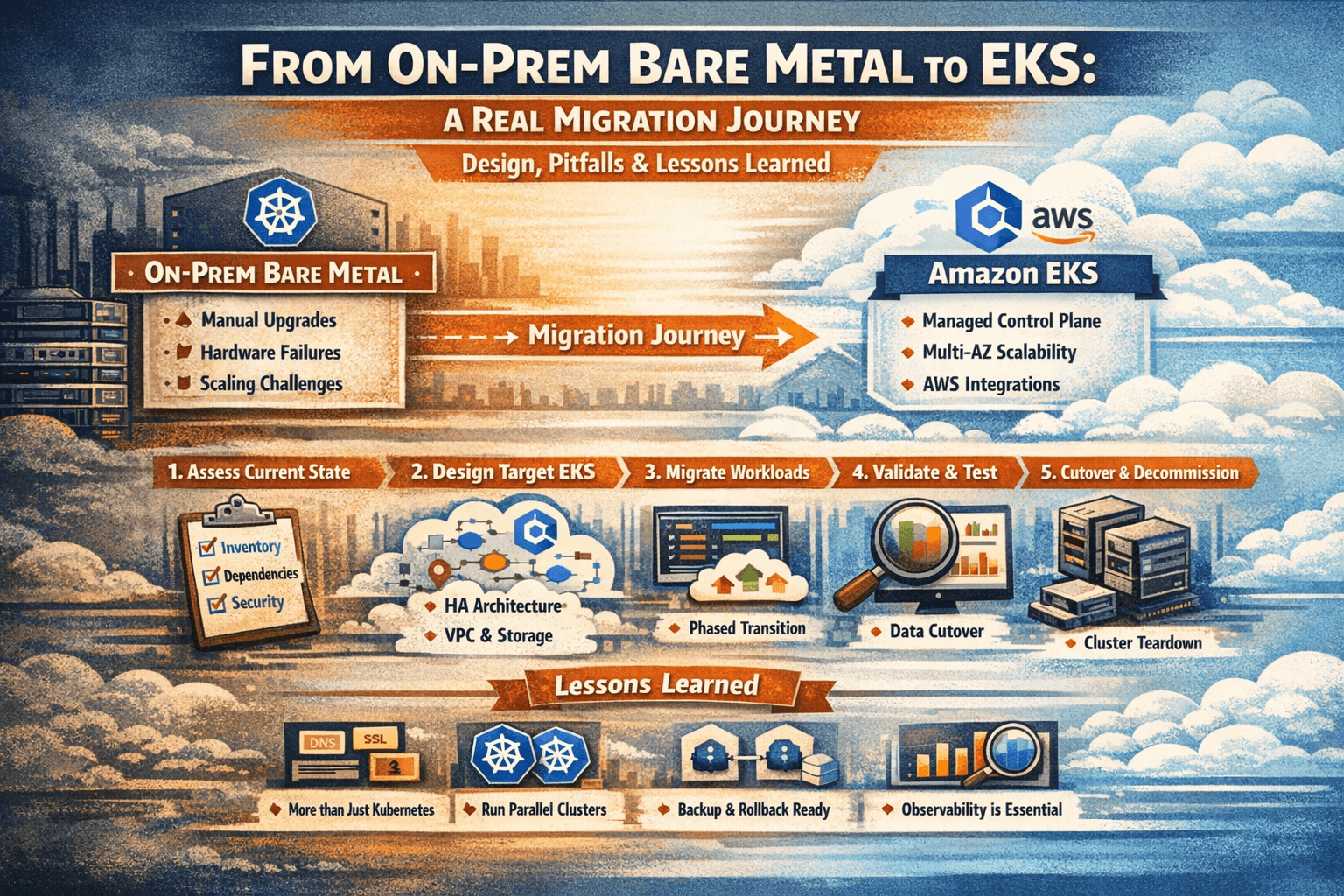
1. Introduction: Why Move from Bare Metal to EKS
- Brief story: on‑prem bare-metal Kubernetes is powerful but painful (manual upgrades, hardware failures, scaling, 24×7 ops).
- Contrast with EKS: managed control plane, automatic updates, multi‑AZ, deep AWS integrations, but new cloud complexity and cost considerations.
Angle: “We’re not just moving pods; we’re moving an entire ecosystem: networking, storage, security, observability, and people.”
2. Current State Assessment (On-Prem Cluster)
Explain that any good migration starts with brutally honest discovery.
Cover:
- Cluster inventory
- Kubernetes version, CNI, Ingress, CSI or local storage, etc.
- Namespaces, deployments, statefulsets, cronjobs, configmaps, secrets.
- Workload characteristics
- Stateless vs stateful services.
- Dependencies: DBs, message queues, external APIs, legacy services.
- Storage model
- Bare metal often uses NFS, local disks, or a storage appliance; map these to EBS/EFS/FSx targets.
- Networking model
- Pod CIDRs, service CIDR, Ingress controller, L4/L7 load balancers, firewalls, DNS.
- Security & compliance
- RBAC model, secrets management (Kubernetes secrets, Vault, files), network policies, image registry.
Pitfall to highlight: “Most teams underestimate the number of ‘hidden’ dependencies: hard‑coded IPs, hostPath volumes, cronjobs talking to local databases, and ad‑hoc scripts on nodes.”
3. Target Design on EKS
Here you design the “future state” architecture for EKS.
3.1. EKS Control Plane & Versions
- Choose EKS region and Kubernetes version (ideally same or higher than on‑prem but compatible; avoid big version jumps).
- Multi‑AZ design for HA.
3.2. Node Groups & Capacity
- Managed node groups vs Fargate pods.
- Instance types based on current CPU/memory usage; include spot for non‑critical workloads.
- Separate node groups for: stateless apps, stateful apps, system components.
3.3. Networking & Connectivity
- VPC design: CIDRs, private/public subnets, NAT gateways, Internet gateways.
- CNI: AWS VPC CNI; IP allocation, security groups per node group.
- Ingress: ALB Ingress Controller or NLB; SSL termination; path/host-based routing.
- Connectivity back to on‑prem during migration: VPN or Direct Connect; hybrid DNS.
3.4. Storage Mapping
- Map existing PV/PVC use to:
- EBS for per‑node/block‑storage workloads (databases, queues).
- EFS for shared, POSIX‑style, multi‑pod access.
- FSx where you need high performance or specific protocols (e.g., Lustre, NetApp).
3.5. Platform Services
- Container registry: ECR with lifecycle policies and scanning.
- Observability stack:
- Logs: CloudWatch logs or OpenSearch; consider sidecars / DaemonSets.
- Metrics: Prometheus + Grafana, managed options, CloudWatch metrics.
- Secrets: AWS Secrets Manager or SSM Param Store + external-secrets operator.
4. Migration Strategy & Approaches
Explain different strategies, then pick one “hero” path for your narrative.
- Big-bang cutover vs phased/canary migration.
- Namespaces‑at‑a‑time vs service‑by‑service.
- Lift-and-shift vs refactor (e.g., moving from hostPath to CSI volumes).
Recommend a phased migration with parallel clusters:
- Keep on‑prem cluster running during migration.
- Stand up EKS with matching versions & basic add‑ons.
- Migrate stateless services first.
- Migrate stateful services with planned data cutover or replication.
- Run both environments in parallel for a soak period.
5. Detailed Step-by-Step Journey
Turn this into the main “story” section with strong headings and code/YAML examples.
Step 1: Build the EKS Foundation
- Provision EKS cluster (IaC: Terraform/CloudFormation/eksctl/Cluster API).
- Create node groups and test baseline workloads.
- Configure networking: public/private subnets, security groups, Ingress with ALB, external DNS.
- Install core add-ons:
- CNI, CoreDNS, kube-proxy.
- Ingress controller (AWS Load Balancer Controller).
- Cluster autoscaler, metrics server.
Step 2: Prepare Manifests & CI/CD
- Export on‑prem manifests and sanitize them:
- Remove cluster‑specific annotations, nodeSelectors tied to old hardware.
- Parameterize configs (Helm, Kustomize).
- Update StorageClass references to EBS/EFS.
- Wire CI/CD to the new cluster:
- Update kubeconfig in pipelines.
- Set up separate environments (dev/stage/prod) in EKS.
Step 3: Migrate Stateless Services
- Deploy shared components (config, secrets, services) first.
- Rollout stateless apps into EKS in lower environments → then prod.
- Use blue/green or canary via Ingress routing / DNS to gradually shift traffic.
- Validate: health checks, error rates, latency, logs.
Step 4: Migrate Stateful Workloads
This is where most real pain occurs; talk about it in detail.
Patterns:
- Database stays on‑prem initially, apps move to EKS (hybrid).
- Or, replicate data to an AWS DB (RDS, Aurora, self‑managed on EKS) and then cutover.
- Data migration tools (e.g., logical dumps, replication, backup/restore).
Key sub-steps:
- Create equivalent PVCs using new StorageClasses (EBS/EFS).
- Ensure backup/restore strategy using tools like Velero before changes.
- Run shadow traffic / read replicas to validate behaviour before switch.
Step 5: Validation & Soak Period
- Define what “success” looks like: SLOs, error budget, performance baselines.
- Automated validation: scripts checking pod health, service endpoints, PVC binding, and app health endpoints.
- Keep both clusters running for N days (e.g., 7–30) while routing majority of traffic to EKS but keeping on‑prem as rollback option.
Step 6: Cutover & Decommission On-Prem
- Final small downtime window if needed for last data sync.
- Update DNS, external integrations, and documentation.
- Final backup and archive of on‑prem cluster state.
- Gradual or immediate teardown of on‑prem workloads, then cluster.
6. Common Pitfalls (And How to Avoid Them)
Draw from real lessons learned.
- Version mismatches
- Problem: on‑prem cluster on much older version; APIs removed in EKS API version.
- Fix: upgrade on‑prem first or refactor manifests to supported APIs.
- Hidden stateful dependencies
- Problem: hostPath volumes, local files, or cronjobs that were never modeled as PVCs.
- Fix: inventory with cluster-wide searches; model everything as PVCs and configs.
- Storage performance assumptions
- Problem: EBS/EFS performance characteristics differ from local SSD; latency spikes, throughput caps.
- Fix: right‑size volumes, use appropriate volume types, test under load.
- Network latency and split-brain architectures
- Problem: apps on EKS talking to on‑prem DBs with high latency; timeouts and cascading failures.
- Fix: plan data gravity early; use regional databases or caching.
- IAM & permissions complexity
- Problem: moving from Linux users/ServiceAccounts to IAM roles and fine-grained policies.
- Fix: adopt IAM Roles for Service Accounts (IRSA); create clear permission models.
- Observability gaps
- Problem: logging/metrics stack left behind; no one can see what’s happening in EKS.
- Fix: before migration, define minimal observability stack and baseline dashboards.
- Cost surprises
- Problem: underestimating NAT GW, load balancer, and storage costs.
- Fix: do capacity planning; use cost‑monitoring dashboards from day one.
7. Concrete Lessons Learned
Turn this into a strong, opinionated section.
- “Kubernetes migration is never just about Kubernetes; it’s about DNS, SSL, IAM, storage, and people.”
- “Run two clusters longer than you think; parallel run buys you sleep during migration.”
- “If you can’t describe your backup and rollback plan in one paragraph, you don’t have one.”
- “Observability is a first-class migration deliverable, not a nice-to-have.”
- “Respect data gravity; move data close to compute or pay in latency and outages.”