
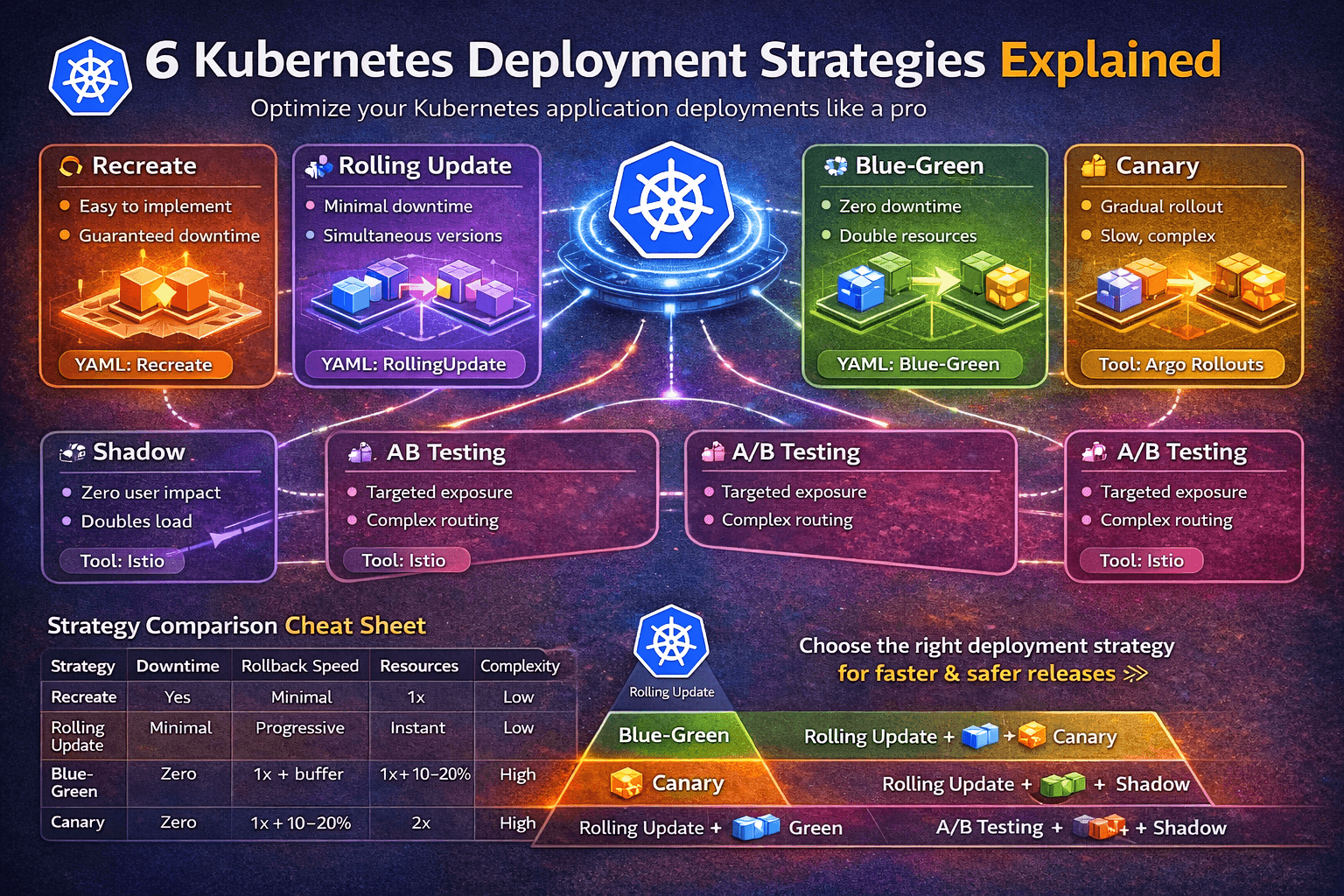
Introduction
Deploying a new version of your application in Kubernetes isn’t just kubectl apply -f. How you deploy matters as much as what you deploy.
The wrong strategy can cause downtime for thousands of users. The right one can make a risky release feel invisible. With 82% of container users running Kubernetes in production, mastering deployment strategies isn’t optional — it’s a core production skill.
In this guide, we break down all 6 major Kubernetes deployment strategies with architecture, YAML examples, trade-offs, and real-world use cases.
What Is a Kubernetes Deployment Strategy?
A deployment strategy is the plan you follow to move a new version of your application into production without surprising your users. In Kubernetes, this plan matters because you’re constantly balancing:
- Delivery speed — how fast can you ship?
- Service safety — how much risk are you exposing users to?
- Resource cost — how much extra capacity does this need?
- Rollback speed — how fast can you recover if something breaks?
Kubernetes natively supports two strategies in the Deployment spec (Recreate and RollingUpdate). For more advanced patterns like Blue-Green, Canary, A/B Testing, and Shadow, you need additional tooling like an Ingress controller, a service mesh (Istio, Linkerd), or a progressive delivery controller (Argo Rollouts, Flagger).
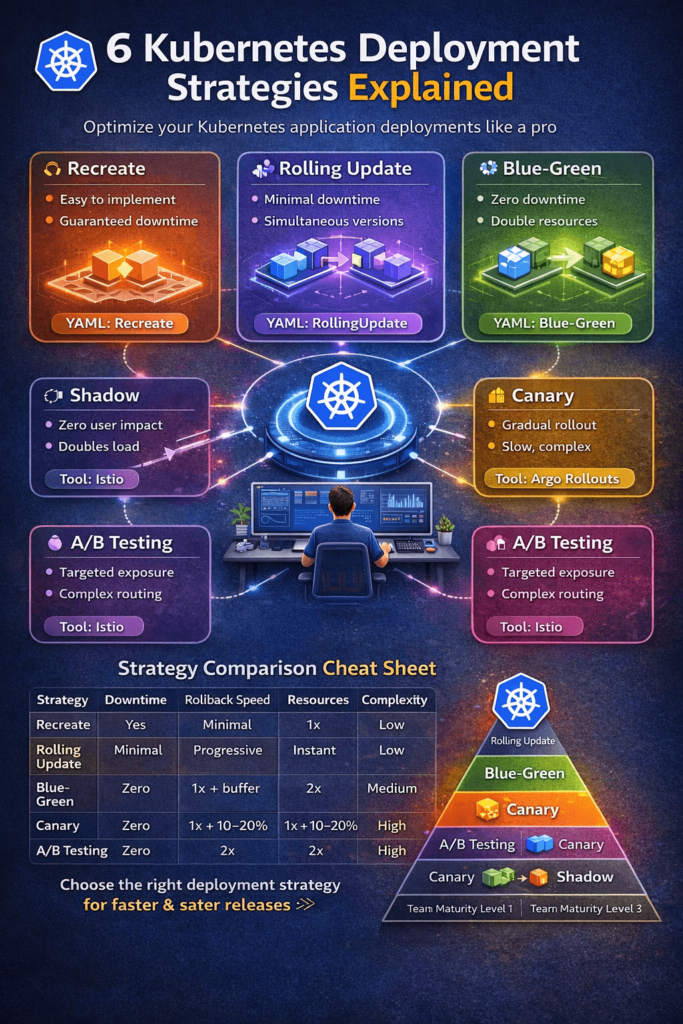
The 6 Kubernetes Deployment Strategies
1. Recreate Deployment
How it works: All existing pods are terminated simultaneously, and the new version is deployed from scratch. There is a window of downtime between the old version going down and the new version coming up.
YAML Example:
apiVersion: apps/v1
kind: Deployment
metadata:
  name: my-app
spec:
  replicas: 3
  strategy:
    type: Recreate
  selector:
    matchLabels:
      app: my-app
  template:
    metadata:
      labels:
        app: my-app
    spec:
      containers:
      - name: my-app
        image: my-app:v2.0
Pros:
- Simple to understand and implement
- No two versions run simultaneously — avoids version compatibility issues
- Clean state for the new version
Cons:
- Guaranteed downtime during the transition
- Not suitable for production user-facing services
- No gradual validation
Best for: Dev/staging environments, internal tools, batch job deployments, or apps that can’t handle two versions running side by side (e.g., DB schema-breaking changes).
2. Rolling Update (Default)
How it works: Pods are replaced incrementally — a few old pods are terminated and new pods are started in their place, repeatedly, until all replicas are updated. Kubernetes manages this via maxSurge and maxUnavailable parameters.
YAML Example:
apiVersion: apps/v1
kind: Deployment
metadata:
  name: my-app
spec:
  replicas: 6
  strategy:
    type: RollingUpdate
    rollingUpdate:
      maxSurge: 2        # How many extra pods can exist during update
      maxUnavailable: 1  # How many pods can be unavailable during update
  selector:
    matchLabels:
      app: my-app
  template:
    metadata:
      labels:
        app: my-app
    spec:
      containers:
      - name: my-app
        image: my-app:v2.0
Pros:
- Zero or minimal downtime
- Native Kubernetes support — no extra tooling needed
- Automatic rollback with
kubectl rollout undo - Resource-efficient (only needs a small buffer of extra pods)
Cons:
- Both old and new versions run simultaneously during the rollout
- Difficult to test the new version in isolation before full exposure
- Rollback is progressive, not instant
Best for: Stateless services, APIs, microservices — it’s the sensible default for most teams. Start here.
Quick rollback command:
kubectl rollout undo deployment/my-app
kubectl rollout status deployment/my-app
3. Blue-Green Deployment
How it works: Two complete, identical environments run side by side. Blue is the current production version serving all traffic. Green is the new version deployed alongside it. After validation, traffic is switched from Blue to Green by updating the Kubernetes Service selector. If anything goes wrong, traffic is switched straight back.
Architecture:
Users → Service → Blue (v1)   ← Active traffic
                  Green (v2)  ← Idle, being validated
After validation:
Users → Service → Green (v2)  ← Active traffic
                  Blue (v1)   ← Idle (kept for rollback)
YAML Example:
# Blue Deployment (v1 - current production)
apiVersion: apps/v1
kind: Deployment
metadata:
  name: my-app-blue
spec:
  replicas: 3
  selector:
    matchLabels:
      app: my-app
      version: blue
  template:
    metadata:
      labels:
        app: my-app
        version: blue
    spec:
      containers:
      - name: my-app
        image: my-app:v1.0
---
# Green Deployment (v2 - new version)
apiVersion: apps/v1
kind: Deployment
metadata:
  name: my-app-green
spec:
  replicas: 3
  selector:
    matchLabels:
      app: my-app
      version: green
  template:
    metadata:
      labels:
        app: my-app
        version: green
    spec:
      containers:
      - name: my-app
        image: my-app:v2.0
---
# Service - switch traffic by changing selector
apiVersion: v1
kind: Service
metadata:
  name: my-app-service
spec:
  selector:
    app: my-app
    version: blue   # Change to "green" to flip traffic
  ports:
  - port: 80
    targetPort: 8080
Traffic switch command:
kubectl patch service my-app-service \
  -p '{"spec":{"selector":{"version":"green"}}}'
Rollback command (instant):
kubectl patch service my-app-service \
  -p '{"spec":{"selector":{"version":"blue"}}}'
| Criteria | Blue-Green | Rolling Update | Canary |
|---|---|---|---|
| Downtime | Zero | Minimal | Zero |
| Resources | 2x | 1x + buffer | 1x + 10–20% |
| Rollback | Instant | Progressive | Instant |
| Pre-prod validation | Complete | Limited | Partial |
| Complexity | Medium | Low | High |
Pros:
- True zero downtime
- Instant rollback — single selector change
- Complete pre-production validation on real infrastructure
- Clean cutover, easy to communicate across teams
Cons:
- Requires double the resources temporarily
- Database migrations need extra care (both versions must be DB-compatible)
- More infrastructure to manage
Best for: Payment gateways, auth services, revenue-critical APIs — anywhere instant rollback is worth the cost of double capacity.
4. Canary Deployment
How it works: The new version is released to a small percentage of users first. You monitor metrics (latency, error rate, CPU), and if everything looks healthy, you progressively expand the rollout to 25%, 50%, 75%, and finally 100% of traffic.
The name comes from “canary in a coal mine” — you expose a small group first to detect problems before they affect everyone.
Architecture:
textUsers (100%) → Service
              ├── v1 Deployment (95% of pods) ← Stable
              └── v2 Deployment (5% of pods)  ← Canary
YAML Example:
# Primary (stable) Deployment - v1
apiVersion: apps/v1
kind: Deployment
metadata:
  name: myapp-primary
spec:
  replicas: 5      # 83% of traffic
  selector:
    matchLabels:
      app: front-end
  template:
    metadata:
      labels:
        app: front-end
        version: v1
    spec:
      containers:
      - name: app-container
        image: myapp-image:1.0
---
# Canary Deployment - v2
apiVersion: apps/v1
kind: Deployment
metadata:
  name: myapp-canary
spec:
  replicas: 1      # 17% of traffic
  selector:
    matchLabels:
      app: front-end
  template:
    metadata:
      labels:
        app: front-end
        version: v2
    spec:
      containers:
      - name: app-container
        image: myapp-image:2.0
---
# Single Service routes to BOTH deployments
apiVersion: v1
kind: Service
metadata:
  name: my-service
spec:
  selector:
    app: front-end   # Matches both v1 and v2 pods
  ports:
  - port: 80
    targetPort: 8080
Traffic split logic: With 5 primary replicas and 1 canary replica, ~17% of traffic hits the canary. Scale canary replicas up gradually while reducing primary replicas to progress the rollout.
For precise traffic splitting (1%), use Argo Rollouts or Istio:
# Argo Rollouts canary example
apiVersion: argoproj.io/v1alpha1
kind: Rollout
metadata:
  name: my-app
spec:
  strategy:
    canary:
      steps:
      - setWeight: 5    # 5% traffic to canary
      - pause: {duration: 10m}
      - setWeight: 25
      - pause: {duration: 10m}
      - setWeight: 50
      - pause: {}       # Manual approval gate
Rollback: Simply scale canary replicas to 0:
kubectl scale deployment myapp-canary --replicas=0
Pros:
- Real-world production validation with minimal user impact
- Fine-grained traffic control with service meshes
- Fast rollback
- Pairs perfectly with observability tools (Prometheus, Grafana, Datadog)
Cons:
- Two versions run simultaneously — needs backward-compatible APIs and schemas
- More complex to implement without a progressive delivery tool
- Requires mature monitoring and alerting to be effective
Best for: High-risk feature releases, ML model updates, backend API changes where confidence is limited. This is the go-to strategy for teams with strong observability.
5. A/B Testing Deployment
How it works: Different user segments are routed to different versions of the application — not based on percentage, but based on user attributes such as location, device, browser, user ID, cookie, or HTTP headers. The goal is to measure behavioral differences between versions, not just technical health.
Architecture:
Users
├── Group A (header: x-user-group=beta) → v2 (new feature)
└── Group B (all others)                → v1 (stable)
Istio-based A/B routing example:
apiVersion: networking.istio.io/v1alpha3
kind: VirtualService
metadata:
  name: my-app
spec:
  http:
  - match:
    - headers:
        x-user-group:
          exact: beta
    route:
    - destination:
        host: my-app
        subset: v2
  - route:
    - destination:
        host: my-app
        subset: v1
Pros:
- Data-driven decision making for product features
- Targeted exposure to specific user groups
- Great for UX experiments and conversion optimization
Cons:
- Requires a service mesh or Ingress controller with header-based routing
- Complex session management needed (sticky sessions)
- Needs analytics infrastructure to measure results
Best for: Product feature experiments, UI/UX changes, pricing page tests, onboarding flow optimization — anywhere you need user-behavior data, not just uptime metrics.
6. Shadow Deployment
How it works: Real production traffic is mirrored (duplicated) to the new version without the new version’s response affecting the user. The user always gets the response from the stable version. The shadow version processes requests silently, and you observe its behavior, performance, and errors.
Architecture:
User Request → v1 (response returned to user)
             → v2 (shadow — processes request, response is discarded)
Istio traffic mirroring example:
apiVersion: networking.istio.io/v1alpha3
kind: VirtualService
metadata:
  name: my-app
spec:
  http:
  - route:
    - destination:
        host: my-app-v1
        port:
          number: 80
      weight: 100
    mirror:
      host: my-app-v2   # Shadow traffic here
    mirrorPercentage:
      value: 100.0       # Mirror 100% of traffic
Pros:
- Absolutely zero user impact — production-like load testing
- Validates performance, error rates, and latency with real traffic
- Ideal for catching issues that don’t appear in staging
Cons:
- Requires a service mesh (Istio, Envoy)
- Can’t validate stateful operations (writes, payments) without side effects
- Doubles infrastructure load temporarily
- Monitoring setup is critical to extract value
Best for: Major infrastructure rewrites, database migrations, new ML model validation in production — any high-stakes change that needs real-traffic validation without user risk.
Strategy Comparison Cheat Sheet
| Strategy | Downtime | Rollback Speed | Resources | Complexity | Best For |
|---|
| Strategy | Downtime | Rollback Speed | Resources | Complexity | Best For |
|---|---|---|---|---|---|
| Recreate | Yes | Slow | 1x | Low | Dev/staging, schema-breaking changes |
| Rolling Update | Minimal | Progressive | 1x + buffer | Low | Most stateless services (default) |
| Blue-Green | Zero | Instant | 2x | Medium | Payments, auth, high-SLA services |
| Canary | Zero | Fast | 1x + 10–20% | High | Risky changes, ML models, APIs |
| A/B Testing | Zero | Fast | 1x + 10–20% | High | Product experiments, UX tests |
| Shadow | Zero | N/A | 2x | High | Infrastructure rewrites, DB migrations |
How to Choose the Right Strategy
Start simple, evolve with maturity:
Team Maturity Level 1 (Starting Out)
└── Rolling Update → Default for everything

Team Maturity Level 2 (Growing)
├── Rolling Update → Standard services
└── Blue-Green     → Revenue-critical services

Team Maturity Level 3 (Advanced)
├── Rolling Update  → Low-risk changes
├── Blue-Green      → High-SLA, payment flows
├── Canary          → High-risk releases with Prometheus monitoring
├── A/B Testing     → Product experiments with