
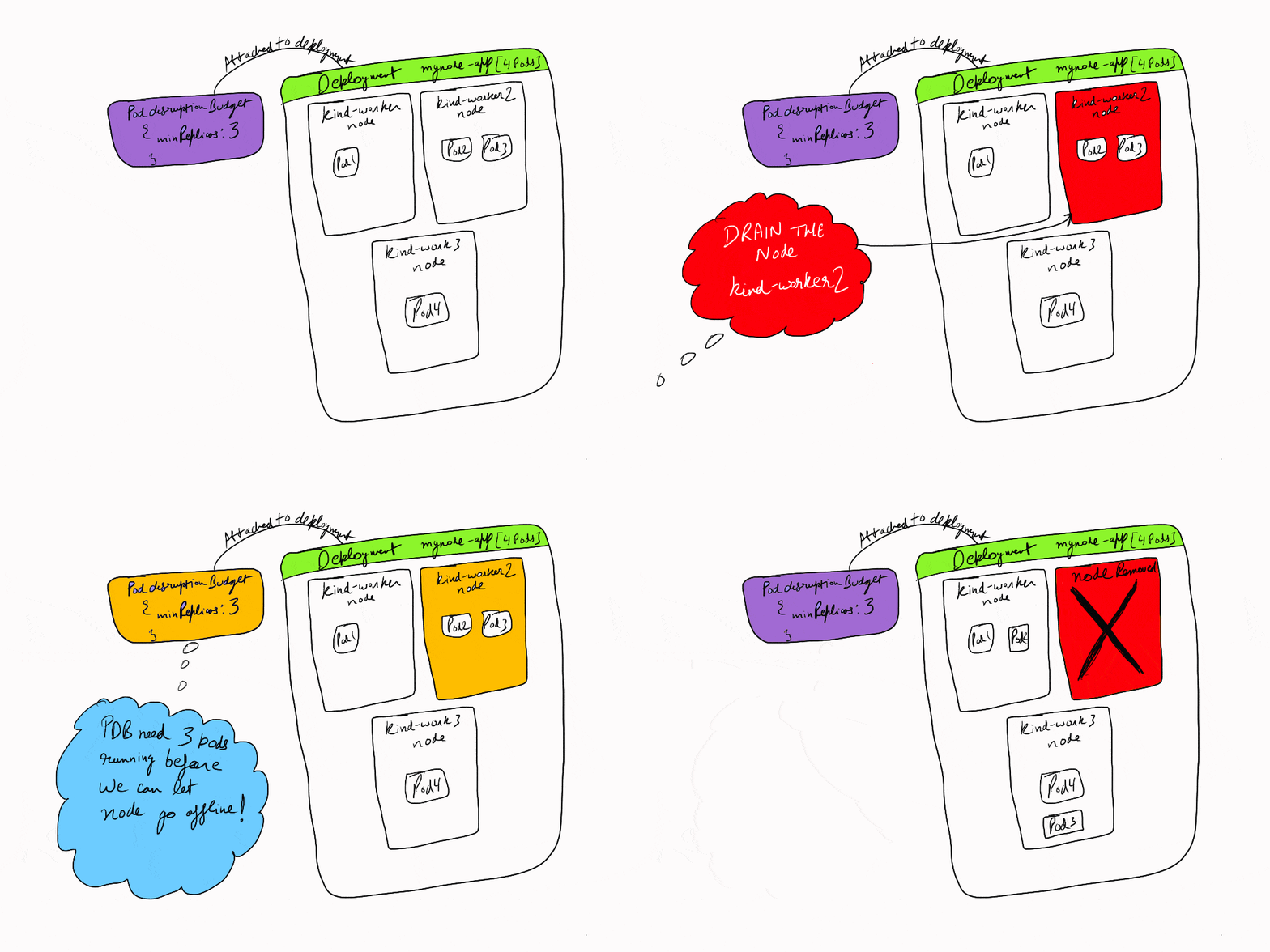
In a modern cloud-native environment, high availability and reliable application performance are paramount. As Kubernetes continues to be the go-to orchestrator for containerized applications, ensuring minimal disruptions and downtime is crucial. One of the critical features Kubernetes offers for this purpose is Pod Disruption Budget (PDB).
In this blog, we’ll dive deep into what PDB is, why it’s important, how it works, and provide a real-time use case to help you grasp the concept better. Along the way, we’ll also point to some valuable resources for further learning. Let’s get started! 😎
What is a Kubernetes Pod Disruption Budget (PDB)? 🧐
A Pod Disruption Budget (PDB) is a policy within Kubernetes that defines the minimum number of pods in a deployment or replica set that must be available during voluntary disruptions. These disruptions can include operations like:
- Node draining for maintenance
- Rolling updates to upgrade pods
- Scaling operations that may affect pod availability
In simpler terms, a PDB ensures that even when Kubernetes is performing maintenance or updates, your application will not experience too much disruption by guaranteeing that a minimum number of pods remain operational.
Why is PDB Important?
Imagine you have a microservices-based application with multiple replicas of your service running. If, during an update, too many pods are taken down at once, it could cause a service outage or degrade the user experience. This is where a Pod Disruption Budget comes into play. It helps prevent such situations by specifying the minimum number of pods that need to be available at any given time.
Without a PDB, Kubernetes may take down too many pods, resulting in downtime or performance degradation. With a PDB, Kubernetes will ensure that enough pods are available for your service to continue functioning, even during updates or other disruptions.
How Does Pod Disruption Budget Work? 🔧
Pod Disruption Budgets work by defining maximum unavailable or minimum available criteria for your pods. You can set these criteria on deployments, stateful sets, or replica sets in Kubernetes.
Key PDB Parameters:
- maxUnavailable: Specifies the maximum number of pods that can be unavailable during a disruption. This can be set as an absolute number (e.g.,
maxUnavailable: 1) or a percentage (e.g.,maxUnavailable: 20%). - minAvailable: Defines the minimum number of pods that must remain available during a disruption. This is useful when you want to ensure a specific level of service availability even during maintenance.
Both parameters ensure that only a certain number of pods are affected during voluntary disruptions.
Example of a PDB YAML Configuration:
apiVersion: policy/v1
kind: PodDisruptionBudget
metadata:
  name: example-pdb
spec:
  minAvailable: 2
  selector:
    matchLabels:
      app: my-app
In this example, the minAvailable: 2 field ensures that at least 2 pods will always remain available for the my-app application, even during maintenance or other disruptions.
Real-World Example & Use Case 🌍
Use Case: High Availability for E-Commerce Service
Imagine you’re running an e-commerce application with several backend services (e.g., inventory management, payment processing, etc.). These services are crucial for the operation of your platform, and downtime would directly result in lost revenue and poor user experience.
Let’s say your e-commerce app is hosted on Kubernetes, and you’re planning a rolling update to deploy a new version of the payment processing service. Without a proper PDB in place, Kubernetes may take down multiple pods during the update, causing the service to be unavailable for a significant amount of time.
By setting a Pod Disruption Budget, you can define how many pods must remain online during the update. For instance, if you set minAvailable: 3, Kubernetes will ensure that at least 3 instances of the payment service are available during the update. This ensures that the payment system remains operational even during the update process.
Steps in the Use Case:
- Deployment: You define a Kubernetes deployment for the payment service with multiple replicas (e.g., 5 pods).
- PDB Configuration: You create a PDB with a
minAvailable: 3policy to ensure that at least 3 pods are always available during maintenance. - Rolling Update: As Kubernetes performs the rolling update, it ensures that no more than 2 pods are taken down at any given time, preventing service degradation or downtime.
Benefits of Using Pod Disruption Budget (PDB) 🎯
- Ensures High Availability: By defining the number of available pods during disruptions, you ensure that your application remains functional at all times.
- Avoids Over-Disruption: Prevents too many pods from being taken down, which can help avoid user-facing issues like service outages or slow responses.
- Better User Experience: When your application is highly available, users experience fewer interruptions, leading to a better overall experience.
Best Practices for Setting PDBs 🏆
- Use the
minAvailablepolicy when you have strict requirements for availability. It ensures that a specified number of pods are always running. - Define PDBs on StatefulSets or Deployments for critical services that require high availability (e.g., databases, payment systems).
- Combine PDB with Horizontal Pod Autoscaling (HPA) to scale pods up or down while maintaining availability.
- Monitor Disruptions: Always monitor your services during disruptions to make sure the desired number of pods are available.
Further Reading & Resources 📚
- Kubernetes Official Documentation on PDB
- Kubernetes PDB in Action (Tutorial)
- Kubernetes Blog on High Availability
Conclusion 🎉
In conclusion, Pod Disruption Budgets are an essential tool in maintaining the reliability and high availability of your applications in Kubernetes. By setting up PDBs correctly, you can ensure that your applications experience minimal disruption during rolling updates, node maintenance, and other voluntary disruptions. Whether you’re managing a critical e-commerce platform or a microservices-based application, PDBs will help you keep your systems running smoothly. 👨💻
Remember, setting a proper PDB is not just about preventing downtime, but also about creating a resilient and scalable infrastructure that your users can depend on. Happy deploying! 🚀